Class Attendance Tracker
Take the register in four keystrokes and get the attendance rate for free.
About the class attendance tracker
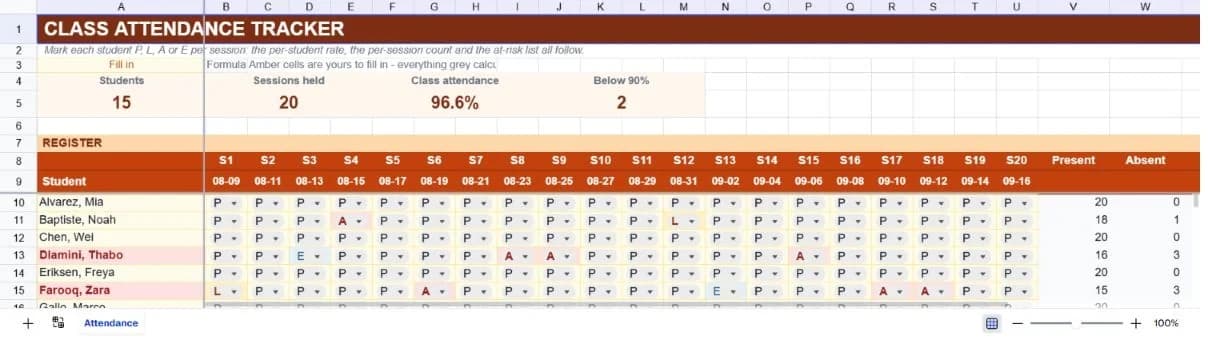
Attendance is one of those records that is trivial to keep and surprisingly hard to use. A paper register tells you who was in the room on a given day. What anyone actually asks for is the percentage per student across the term, which absences were excused, and who has dropped below the threshold that triggers a conversation. Working those out by hand from a register is an afternoon's job; this template does it as you mark.
The layout is a grid: students down the left, twenty sessions across the top, one letter in each cell. P for present, L for late, A for an unexplained absence, E for an excused one. Those four letters are a strict dropdown, because every figure on the sheet is a count of them and a stray lower-case p would silently drop a session out of the totals.
The handling of those four marks is where the template earns its place. Late still means the student was there, so it counts toward attendance while being tallied separately for anyone who needs that pattern. Excused absences come out of the denominator instead of counting against the student, which is how most attendance policies actually read and almost no simple spreadsheet gets right. Anyone below ninety percent has their name highlighted, and the summary strip counts how many students that is.
What’s in the template
Everything below is already built into the file. Open it and it’s there.
Twenty-session register grid
Fifteen students filled in and thirty-five rows formatted, with dated session columns across the top and a frozen student column so names stay visible as you scroll right.
Four-mark dropdown
Present, Late, Absent and Excused as single letters, enforced as a strict list so the counts underneath cannot be broken by a typo.
Attendance rate that handles excused absences
Excused absences leave the denominator rather than counting as a miss, so a student with a documented reason is not penalised in their percentage.
At-risk highlighting
Any student below ninety percent has their name highlighted and is counted in the summary strip. The threshold is an ordinary rule you can change to match your own policy.
Per-session headcount footer
A row under the register counting who attended each session, so a session with unusually low turnout is visible without reading down every column.
Mark key
The four letters and what they mean, written under the register, so the sheet explains itself to a colleague who inherits it.
Who it’s for
Teachers taking a regular register
Twenty sessions covers half a term of twice-weekly classes or a full term of weekly ones, and the marking is a dropdown rather than typing, so taking the register stays a two-minute job.
Course and workshop leaders
Short courses with a required attendance percentage need exactly this: a rate per participant that accounts for excused absences and shows who has fallen short.
Tutors and clubs
Anywhere attendance affects eligibility, funding or a certificate, the per-student percentage is the number that gets asked for, and here it is already calculated.
Administrators pulling attendance reports
The per-session footer gives you headcount by date, and the per-student column gives you rates by person. Between them that is most of what an attendance report contains.
How to use the class attendance tracker
- 1
Replace the sample students and dates
Type over the fifteen names and set the session dates along row nine to match your own schedule. Everything below recalculates as you go.
- 2
Mark the register from the dropdown
Click a cell, pick a letter. Using the dropdown rather than typing is what keeps the counts reliable, and it is faster than typing anyway.
- 3
Use E rather than A when an absence is explained
This is the distinction the whole sheet turns on. An E is removed from the calculation; an A counts against the student. Marking everything A makes the percentages meaningless.
- 4
Check the at-risk count weekly
The summary strip counts students below ninety percent. Reading it once a week catches a pattern early, which is the only point at which attendance problems are still easy to fix.
The formulas that ship with it
Every one of these is already in the file. They’re listed so you can see how it works, and change it if you want to.
Attendance rate (column Y)
=IF(OR($A10="",COUNTA(B10:U10)-COUNTIF(B10:U10,"E")=0),"",(V10+X10)/(COUNTA(B10:U10)-COUNTIF(B10:U10,"E")))Present plus late, over sessions marked minus excused ones. The guard stops a student marked only as excused producing a divide-by-zero.
Present count (column V)
=IF($A10="","",COUNTIF(B10:U10,"P"))A straight count of P marks across the row, blank for rows with no student on them so the register does not fill with zeros.
Session headcount (footer row)
=COUNTIF(B10:B44,"P")+COUNTIF(B10:B44,"L")Everyone who was in the room that session, present or late. Repeated down each session column to give attendance by date.
Students below threshold (summary strip)
=COUNTIF(Y10:Y44,"<0.9")Counts attendance rates under ninety percent. Change the figure in the criterion to match whatever threshold your institution uses.
Tips for getting more out of it
- Mark the register during the session rather than after it. Reconstructed attendance is guesswork, and it is the version that gets challenged when it matters.
- Decide what counts as excused before term starts and write it in the mark key. The distinction between A and E is a policy question, not a spreadsheet one, and inconsistency between colleagues is what makes attendance data untrustworthy.
- If you need more than twenty sessions, keep one sheet per term rather than widening this one. Twenty columns is about as far right as anyone can read comfortably.
- Ask the assistant which students are trending down rather than simply sitting below the line. A student at 91% who has missed the last three sessions matters more than one at 88% who missed three in September.
Ask questions about your data, generate formulas in plain English, and create charts instantly, all on top of the Class Attendance Tracker.
Questions about this template
Save hours
Skip the setup. Start from a ready-made structure.
Error-free
Pre-tested formulas that just work.
Professional
Designed for real-world use, ready to share.
Consistent
Maintain standards across every document.
Ready to use the Class Attendance Tracker?
No setup, no learning curve, just results. Start free in seconds.
Pay as you go, no subscription required