Comprehensive Grade Book
Set the weighting once and every student's score and letter grade follows from it.
About the comprehensive grade book
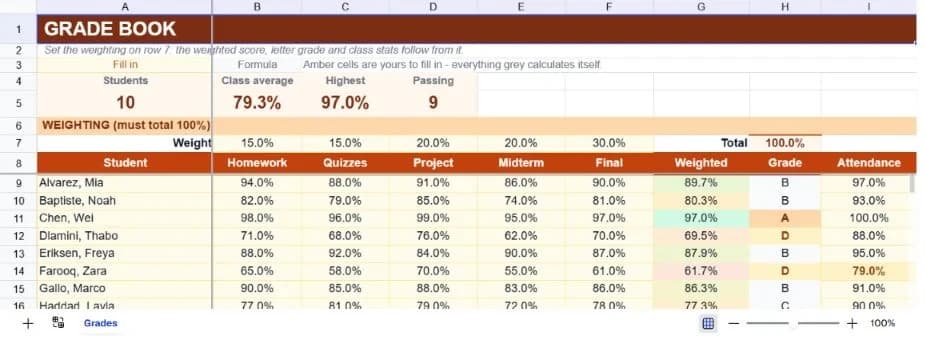
A weighted grade book has one job that a plain average can't do: let homework count for fifteen percent and the final exam for thirty, and recalculate everything the moment you decide those proportions were wrong. This template puts the weights on a single editable row and drives every student's score from it.
Five assessment categories ship pre-configured (homework, quizzes, project, midterm and final) with weights totalling one hundred percent and a check cell so you can see immediately if an edit has broken that. Ten sample students carry realistic scores, so the sheet demonstrates itself before you replace them.
Each student's weighted score produces a letter grade automatically on a standard ninety-eighty-seventy-sixty scale, and a distribution block at the bottom counts how many students landed in each band with their share of the class. Class averages run along the bottom of every column, including attendance.
What’s in the template
Everything below is already built into the file. Open it and it’s there.
Summary strip
Student count, class average, highest weighted score and how many students are passing at D or above.
Editable weighting row
Five category weights with a total cell, so a scheme that no longer adds to a hundred percent is visible at a glance.
Thirty student rows
Ten worked examples spanning the full grade range, with formatted blank rows for the rest of the class.
Automatic weighted score
Each student's scores multiplied by the weight row, so editing a weight moves every score in the class at once.
Letter grades
A to F on a standard ninety-eighty-seventy-sixty scale, derived from the weighted score.
Grade distribution
Count and percentage of the class in each letter band, plus class averages along the bottom of every column.
Who it’s for
Teachers running a weighted scheme
Changing a weight mid-term is a one-cell edit rather than a rebuild, which makes it possible to correct a scheme that isn't working.
Tutors tracking a small cohort
Thirty student rows covers most classes, and the distribution block turns a list of scores into something you can talk about.
Instructors reporting on outcomes
Class averages per assessment show which component the cohort struggled with, which is a different question from who struggled.
Students tracking their own standing
Enter your own scores against the published weighting and you'll know what the final needs to be.
How to use the comprehensive grade book
- 1
Set your weights first
Edit the five percentages on the weighting row and check the total reads 100%. Everything on the sheet depends on this row.
- 2
Rename the assessment columns
Homework, quizzes, project, midterm and final are placeholders. Rename them to your actual assessments; no formula reads the headers.
- 3
Enter scores as percentages
Every score column is formatted as a percentage, so enter 0.86 or 86% rather than a raw mark out of some total.
- 4
Read the distribution, not just the average
A class average of 79% can be a tight cluster or a split between excellent and failing. The distribution block tells you which.
The formulas that ship with it
Every one of these is already in the file. They’re listed so you can see how it works, and change it if you want to.
Weighted score (column G)
=IF(A9="","",SUMPRODUCT(B9:F9,$B$7:$F$7))Multiplies each score by its weight and sums the result. The absolute reference to the weight row is what makes a single weight edit move the whole class.
Letter grade (column H)
=IF(G9="","",IF(G9>=0.9,"A",IF(G9>=0.8,"B",IF(G9>=0.7,"C",IF(G9>=0.6,"D","F")))))Nested thresholds on a standard scale. Edit the numbers to match your institution's boundaries.
Passing count
=COUNTIF(G9:G38,">=0.6")Counts weighted scores at or above sixty percent. Blank rows aren't matched by a numeric comparison, so unfilled rows don't inflate it.
Grade distribution
=COUNTIF($H$9:$H$38,A43)Counts students holding each letter, matching the letter written in the distribution block's left column.
Tips for getting more out of it
- Check the weight total after every edit. A scheme summing to 95% quietly deflates every grade in the class and is easy to miss.
- Enter scores as you mark rather than in one sitting. The class average updates as you go and tells you early if an assessment was mis-pitched.
- If you curve, do it by editing the letter-grade thresholds rather than by adjusting individual scores. The scores stay a record of what students actually did.
- The attendance column sits outside the weighting on purpose. Fold it in only if your scheme genuinely grades attendance.
Ask questions about your data, generate formulas in plain English, and create charts instantly, all on top of the Comprehensive Grade Book.
Questions about this template
Save hours
Skip the setup. Start from a ready-made structure.
Error-free
Pre-tested formulas that just work.
Professional
Designed for real-world use, ready to share.
Consistent
Maintain standards across every document.
Ready to use the Comprehensive Grade Book?
No setup, no learning curve, just results. Start free in seconds.
Pay as you go, no subscription required