Employee Directory & Org Chart
A staff list that also answers headcount and tenure questions without a second spreadsheet.
About the employee directory & org chart
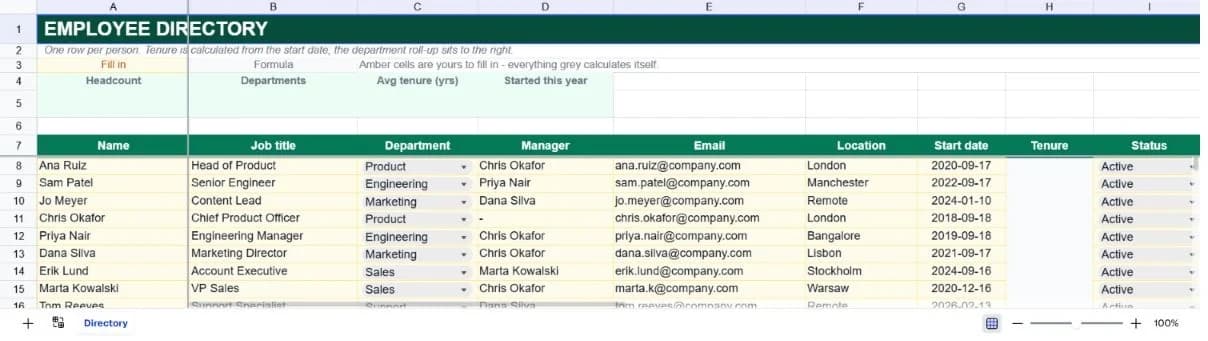
Every organisation ends up with a staff list, and most of them are just a table of names and emails that someone has to count by hand whenever a headcount question arrives. This template keeps the contact directory and the reporting summary in the same sheet so both stay current from one set of edits.
Each person carries a name, job title, department, manager, email, location, start date and status. Tenure is calculated from the start date rather than typed, which means it's correct every time you open the file instead of correct on the day someone last updated it.
A department roll-up to the right of the table counts active people per department and their share of the total. It counts only staff marked Active, so leavers can stay in the sheet as history without inflating your headcount.
What’s in the template
Everything below is already built into the file. Open it and it’s there.
Summary strip
Active headcount, number of departments, average tenure in years and how many people started this calendar year.
Forty staff rows
Ten worked examples spanning six departments and several locations, with reporting lines that form a coherent structure.
Automatic tenure column
Years since the start date, calculated with a 365.25-day year so long tenures don't drift.
Active status column
Headcount and department counts read this column, so former staff can remain in the sheet without being counted.
Department roll-up
People and percentage of staff per department, with a total row, sitting beside the main table.
Frozen header and name column
Names and headers stay visible as you scroll across to location and start date on a wide table.
Who it’s for
Small companies without an HR system
Covers the directory and headcount reporting that an HRIS provides, at the scale where an HRIS isn't yet worth buying.
Managers onboarding new starters
The manager and department columns give a new joiner the shape of the organisation on their first morning.
Operations teams reporting headcount
Department counts and shares are derived, so a headcount question is answered by opening the file rather than by counting rows.
Anyone tracking tenure and anniversaries
Automatic tenure in years surfaces work anniversaries and gives you an average tenure figure for retention conversations.
How to use the employee directory & org chart
- 1
Replace the sample staff
Type over the ten example rows. Keeping the column order means the tenure calculation and the department roll-up keep working untouched.
- 2
Match department names exactly
The roll-up counts on text. If the table says Engineering and the roll-up says Eng, that department reads as zero people.
- 3
Mark leavers rather than deleting them
Change status from Active to something else. They drop out of headcount immediately but stay available as history.
- 4
Keep start dates as real dates
Tenure is date arithmetic. A start date typed as text produces a blank tenure rather than an error, which is easy to miss.
The formulas that ship with it
Every one of these is already in the file. They’re listed so you can see how it works, and change it if you want to.
Tenure (column H)
=IF(G8="","",ROUND((TODAY()-G8)/365.25,1))Years since the start date to one decimal. The .25 accounts for leap years, which matters once tenures pass about eight years.
Active headcount
=COUNTIF(I8:I47,"Active")Counts the status column rather than the rows, which is what lets leavers stay in the sheet.
Department count
=COUNTIFS($C$8:$C$47,K8,$I$8:$I$47,"Active")Two conditions (matching department and active status) so a department's figure never includes people who have left.
Started this year
=COUNTIF(G8:G47,">="&DATE(YEAR(TODAY()),1,1))Counts start dates on or after 1 January of the current year, rebuilt from today's date so it stays correct into future years.
Tips for getting more out of it
- Directories drift within weeks. Pick one owner and one update cadence. Reviewing it monthly is enough to keep it trusted.
- Be careful about what you put in a file that gets shared widely. Work contact details are usually fine; home addresses, salaries and dates of birth belong somewhere with access controls.
- Use a consistent name format, surname first or first name first, so sorting produces something usable.
- The manager column can generate an org chart. Ask the AI assistant to build the reporting tree from the name and manager columns.
Ask questions about your data, generate formulas in plain English, and create charts instantly, all on top of the Employee Directory & Org Chart.
Questions about this template
More business templates
Project Task Tracker
Owners, due dates and progress per task, plus a live count of what's overdue.
Use thisProfessional Invoice
Fifteen line items with per-line discounts. Subtotal, tax and balance due calculate themselves.
Use thisInventory Management System
Stock value per SKU and an automatic reorder flag the moment a line drops to its reorder point.
Use thisSave hours
Skip the setup. Start from a ready-made structure.
Error-free
Pre-tested formulas that just work.
Professional
Designed for real-world use, ready to share.
Consistent
Maintain standards across every document.
Ready to use the Employee Directory & Org Chart?
No setup, no learning curve, just results. Start free in seconds.
Pay as you go, no subscription required