Professional Invoice
Fill in the amber cells and every total, tax figure and balance works itself out.
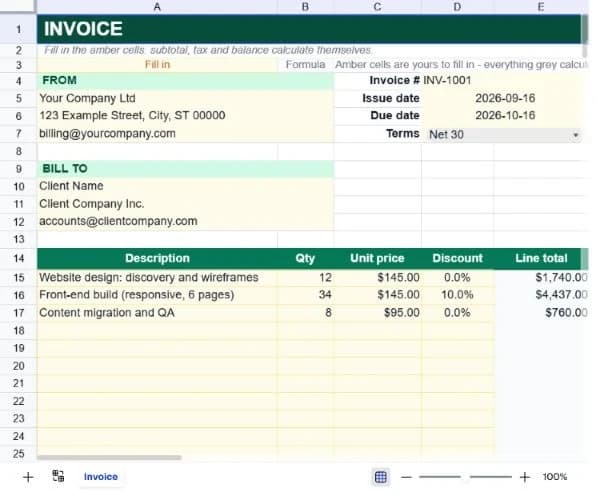
About the professional invoice
An invoice has one job beyond asking for money: being clear enough that nobody has to email you a question before paying it. This template covers the fields that generate those questions: who is billing whom, what for, at what rate, when payment is due and where to send it.
Fifteen line items each take a description, quantity, unit price and an optional per-line discount, with the line total calculated for you. Blank rows stay genuinely blank rather than printing a column of $0.00 entries, which is what makes the finished document look like an invoice rather than a form.
The totals block runs subtotal, tax rate, tax, shipping, total due, amount paid and balance due. Keeping amount paid on the invoice means the same document works for a deposit, a part payment and a final balance without you rebuilding it each time.
What’s in the template
Everything below is already built into the file. Open it and it’s there.
From, bill-to and invoice detail blocks
Your details, the client's, and the invoice number, issue date, due date and payment terms, laid out across the top.
Fifteen line items
Description, quantity, unit price and discount, with an automatic line total. Three worked examples show the intended shape.
Per-line discount column
A percentage applied to that line only, which is more flexible than a single invoice-level discount and reads more transparently to the client.
Totals block
Subtotal, tax rate, tax, shipping, total due, amount paid and balance due, each derived except the three you set.
Notes and payment instructions
A wrapping block at the bottom for bank details and late-payment terms, pre-filled with a standard form of wording.
Dates that default to today
Issue date is today and due date is thirty days out when you open it, so a Net 30 invoice needs no date editing at all.
Who it’s for
Freelancers and contractors
Hourly or day-rate work with a quantity and a rate per line, and a discount column for the occasional goodwill reduction.
Small businesses invoicing by hand
Everything invoicing software does for a business issuing a handful of invoices a month, without the subscription.
Anyone sending a one-off bill
Selling something privately or billing for a favour that turned into work; the whole document is one screen.
Businesses taking deposits
The amount-paid line turns the same invoice into a running statement rather than requiring a separate one for the balance.
How to use the professional invoice
- 1
Fill in your details once
The From block and the notes block rarely change. Set them up, then duplicate this sheet for each new invoice rather than starting fresh.
- 2
Add your line items
Description, quantity and unit price. The line total appears automatically; leave the discount column empty unless you're actually discounting.
- 3
Set the tax rate
One cell in the totals block. The tax figure and total due follow from it, so you never calculate tax by hand.
- 4
Export to PDF and send
Use Print to produce a PDF. Clients should receive a fixed document, not a spreadsheet they can edit.
The formulas that ship with it
Every one of these is already in the file. They’re listed so you can see how it works, and change it if you want to.
Line total (column E)
=IF(B15="","",ROUND(B15*C15*(1-IF(D15="",0,D15)),2))Quantity times price, less any discount, rounded to two decimals. The outer IF is what keeps unused rows blank instead of printing $0.00 down the page.
Subtotal
=SUM(E15:E29)Sums every line including the empty ones, which contribute nothing because they hold an empty string rather than a zero.
Tax
=ROUND(E31*E32,2)Subtotal times the rate you set, rounded so the invoice never carries a fractional penny into the total.
Balance due
=E35-E36Total due less amount paid, which is what makes the same document work for deposits and part payments.
Tips for getting more out of it
- Use sequential invoice numbers with no gaps. Most tax authorities expect it, and gaps are the first thing an audit asks about.
- State payment terms as a date, not just 'Net 30'. An explicit due date measurably shortens how long invoices sit unpaid.
- Round your quantities sensibly. Billing 12.4 hours invites a conversation that billing 12.5 does not.
- Always send a PDF. Sending an editable spreadsheet invites edits, and it looks less finished than a fixed document.
Ask questions about your data, generate formulas in plain English, and create charts instantly, all on top of the Professional Invoice.
Questions about this template
More business templates
Project Task Tracker
Owners, due dates and progress per task, plus a live count of what's overdue.
Use thisEmployee Directory & Org Chart
Contact details and reporting lines, with tenure and department headcount derived automatically.
Use thisInventory Management System
Stock value per SKU and an automatic reorder flag the moment a line drops to its reorder point.
Use thisSave hours
Skip the setup. Start from a ready-made structure.
Error-free
Pre-tested formulas that just work.
Professional
Designed for real-world use, ready to share.
Consistent
Maintain standards across every document.
Ready to use the Professional Invoice?
No setup, no learning curve, just results. Start free in seconds.
Pay as you go, no subscription required