






















61%
Say unreliable data holds FP&A back
A representative finance workflow that matches transactions, categorizes exceptions, and prepares the remaining rows for human review.
Explore finance workflowsSheetAI is the AI agent analyst for people who live in Excel, CSV, and Google Sheets data. Import the file, ask in plain language, and get it cleaned, modeled, charted, and explained, as formulas you can check.
Organic has the lowest cost per lead at $4.00. Among paid channels, Paid Social ($28.00) beats Paid Search ($40.00). F1:I7 recalculates if the export changes.
Pull data from 25 apps straight into your sheet with one-click sign-in, or add any MCP server by URL. And use SheetAI itself from Claude, ChatGPT, Cursor and Claude Code.
Import a file, ask, review what the AI wrote, accept it or reject it, export. Unedited.
No export to a chat window, no pasted numbers. The agent reads the ranges it needs, writes standard formulas, and stops the moment it is unsure.
Click any cell the agent filled and the formula is in the bar. Standard Excel syntax, so you can check its work the way you would check a colleague's.
Trailing spaces, mixed dates, currency strings, duplicates. Fixed in place, with a note of what changed.
Placed beside the table they read from, and still live when the data changes.
25 connectors with one-click sign-in, or any MCP server by URL.
Each step is a version. Accept it or reject it, then export to .xlsx or .csv.
The same agent in the browser, in an Excel task pane, in a Google Sheets sidebar, or from your AI client over MCP.
Every image below is a capture of the real grid. Nothing is mocked up.
One request. The agent laid out the KPI cards, the alerts block, the regional table and the monthly trend chart, moved the raw rows to a Data tab, applied the number formats and conditional formatting, then checked every formula before handing back. Its own summary of the work is on the right.
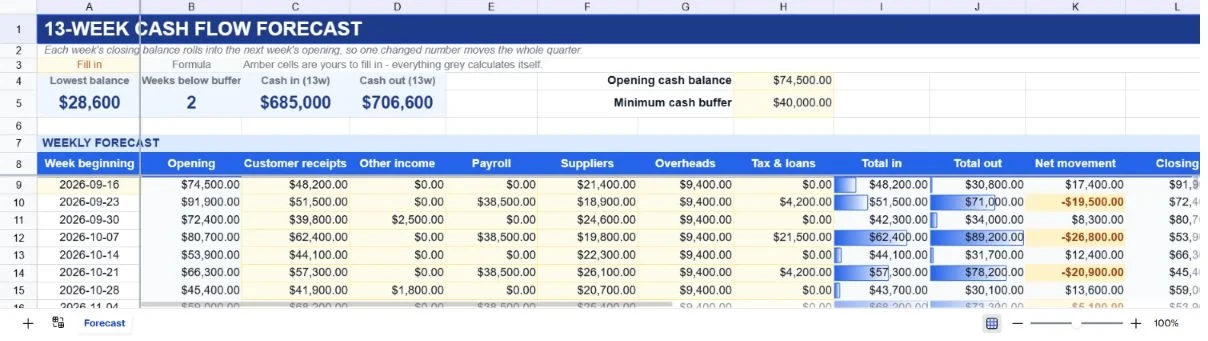
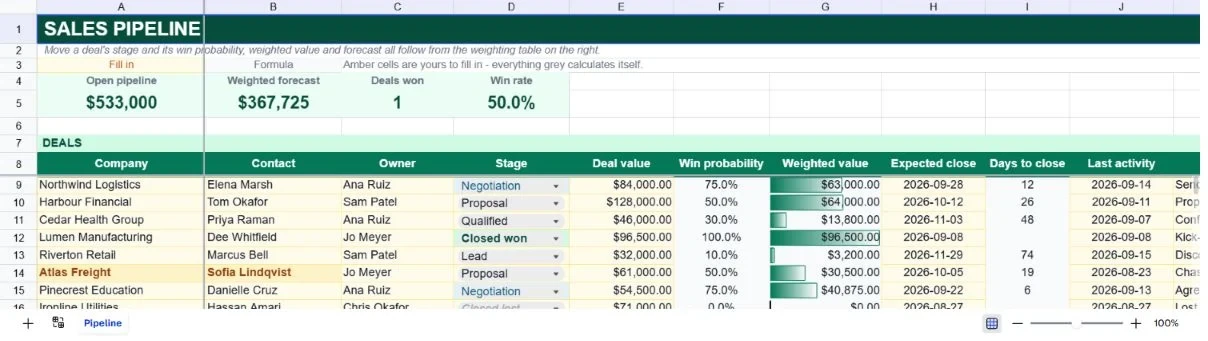
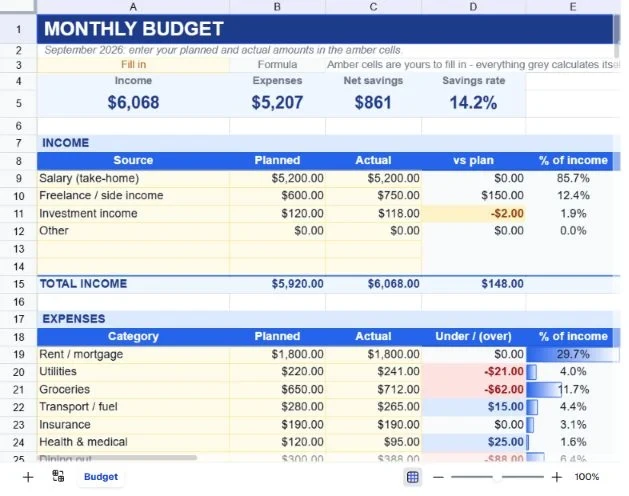
Click any cell the AI filled and the formula is right there in the bar - standard Excel syntax, nothing pasted. Amber cells are yours to fill in; every grey cell calculates itself; anything below target flags itself red. Check its work the way you would check a colleague's.
A 40-row campaign export, one question - which channel has the best cost per lead? - and the answer lands beside the data as a summary block built from SUMIF and IFERROR formulas, with the chart placed underneath. Ready for the deck, still live if the numbers change.
Templates are real workbooks, not pictures: every calculating cell is a formula. Open one and ask the AI to change it - add a currency, extend the horizon, swap the categories.
Not testimonials. Each number comes from a described scenario in the use-case guides.
A representative finance workflow that matches transactions, categorizes exceptions, and prepares the remaining rows for human review.
Explore finance workflowsA benchmark scenario using a four-warehouse cycle-count export to produce one SKU-level variance report with suggested adjustments.
Explore operations workflowsAn illustrative workflow that combines lead, campaign, and revenue exports to build a reviewable, formula-based attribution report.
Explore marketing workflowsYour time and results will vary with the size and condition of your data.
Automate reconciliation, build variance packs, close faster.
The spreadsheet, templates, file storage, and the Excel and Google Sheets™ add-ins are free on every account. Credits are spent only when the AI does something for you.
For light, regular use.
Billed monthly
What you get
For daily professional work.
Billed monthly
Everything in Starter, plus
For teams that need full control.
Billed monthly
Everything in Professional, plus
Need more than 10,000 credits a month? Talk to us
Bigger plans cost less per credit. Switch to yearly for another 30% off.
Roughly 1-10 credits per AI request. Pick the tier that matches your usage.
Or start free with 10 credits on signup, no card required.
Your sheets and chats are processed only to answer you. Providers may hold them briefly for abuse monitoring; none train on them.
Every request runs over TLS, to servers in Europe. Sessions end after 3 days without activity.
A sheet is visible to you and only the people you share it with - view, comment, or edit, your call.
Export to .xlsx or .csv any time. Delete your account and every sheet and chat goes with it.
Start on the free signup credits. Import the sheet you least want to open on Monday and see what comes back.
Works in your browser and Google Sheets · Setup in 30 seconds