Personal Budget Tracker
See where your money actually went, not just where you meant it to go.
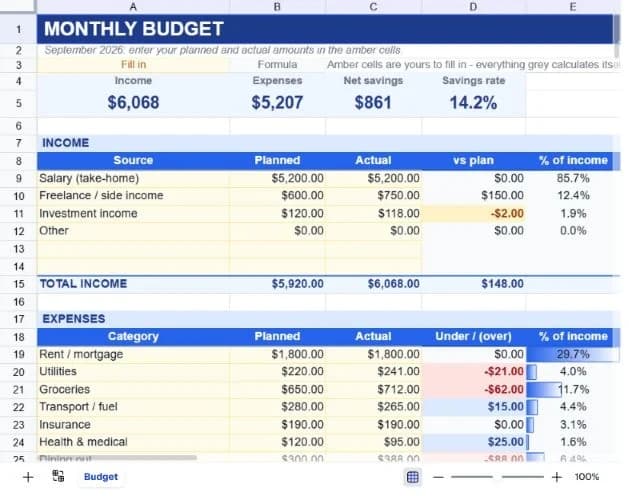
About the personal budget tracker
Most budgets fail at the same point: you write down what you intend to spend, the month happens, and nobody ever goes back to compare. This template puts planned and actual side by side so that comparison is the default view rather than a chore you have to remember.
The layout splits into two blocks. Income sits at the top with a row per source, and expenses run underneath across twelve categories that cover the ordinary shape of a household: housing, utilities, groceries, transport, insurance, health, dining, entertainment, subscriptions, debt, savings and a catch-all. Both blocks total themselves, and a summary strip at the very top gives you income, expenses, net savings and savings rate at a glance.
One detail worth understanding before you start: the variance column flips direction between the two blocks. For income, it reads actual minus planned, because earning more than expected is good news. For expenses it reads planned minus actual, so a positive number means you came in under budget. That way a positive figure is always the outcome you wanted, wherever you look on the sheet.
What’s in the template
Everything below is already built into the file. Open it and it’s there.
Summary strip
Income, expenses, net savings and savings rate across the top, all driven by the blocks below, with nothing to update by hand.
Income block with six rows
Salary, freelance, investment income and other, plus two spare rows, each with planned, actual, variance and share of total income.
Twelve expense categories
Rent or mortgage, utilities, groceries, transport, insurance, health, dining out, entertainment, subscriptions, debt payments, savings and other, with two spare rows.
Percentage-of-income column
Every category shows what share of your actual income it consumed, which is the number that matters when you compare months of different sizes.
Net position row
Income minus expenses for both planned and actual, so you can see whether the month beat the plan or the plan was simply wrong.
Colour-coded cells
Amber cells are yours to type in; grey cells calculate themselves. You never have to guess which numbers you're allowed to overwrite.
Who it’s for
Anyone starting a budget
The categories are pre-filled with realistic figures, so you're editing a working example rather than staring at an empty grid wondering what counts as a category.
Couples splitting household costs
Income takes multiple sources, so two salaries plus side income all roll into one household picture with a single savings rate.
People paying down debt
Debt payments and savings both have their own expense rows, so you can watch them as deliberate allocations rather than whatever is left over.
Freelancers with variable income
The planned column becomes your conservative estimate and the actual column catches the reality, which makes the gap between them visible month to month.
How to use the personal budget tracker
- 1
Set your planned column first
Work down the planned column for both income and expenses before the month starts. Rough numbers are fine. The point is having something to compare against.
- 2
Fill in actuals as you go
Update the actual column weekly rather than at month end. Ten minutes a week beats an hour of archaeology through bank statements.
- 3
Read the variance column
Positive is always good. Scan for the largest negative numbers in the expense block. Those are the categories that broke the plan.
- 4
Ask the assistant what changed
Once the numbers are in, ask questions in plain English: which categories am I over budget on, what's my biggest expense, how does this compare to a 20% savings rate.
The formulas that ship with it
Every one of these is already in the file. They’re listed so you can see how it works, and change it if you want to.
Savings rate (summary strip)
=IF(C15=0,0,(C15-C33)/C15)Net savings as a share of actual income, guarded so an empty sheet shows zero instead of a divide-by-zero error.
Expense variance (column D)
=IF(A19="","",B19-C19)Planned minus actual, so under-spending shows as a positive number. Blank rows stay blank rather than reading $0.00.
Share of income (column E)
=IF(OR(A19="",$C$15=0),"",C19/$C$15)Each category as a percentage of total actual income, with an absolute reference so the figure holds as you add rows.
Category totals
=SUM(C19:C32)Totals cover the spare rows as well as the filled ones, so anything you add is picked up without editing the formula.
Tips for getting more out of it
- Set savings as an expense line rather than whatever remains at month end. Paying yourself first is the single change that most reliably moves the savings rate.
- If a category is consistently over by the same amount, the plan is wrong, not your spending. Adjust the planned figure rather than feeling bad about it.
- Duplicate the sheet each month rather than overwriting it, so you build a run of history you can compare.
- Watch the percentage-of-income column rather than the raw figures if your income varies. It's the only fair comparison across uneven months.
Ask questions about your data, generate formulas in plain English, and create charts instantly, all on top of the Personal Budget Tracker.
Questions about this template
More finance templates
Sales Performance Dashboard
Quarterly bookings against annual quota, with attainment and gap-to-target per rep.
Use thisBusiness Expense Report
Receipts, mileage and approvals on one form, with separate billable and reimbursable totals.
Use this13-Week Cash Flow Forecast
Thirteen weeks of receipts and payments, with each week's closing balance rolling into the next.
Use thisSave hours
Skip the setup. Start from a ready-made structure.
Error-free
Pre-tested formulas that just work.
Professional
Designed for real-world use, ready to share.
Consistent
Maintain standards across every document.
Ready to use the Personal Budget Tracker?
No setup, no learning curve, just results. Start free in seconds.
Pay as you go, no subscription required