Business Expense Report
One form your finance team can actually process: receipts, mileage and approvals in one place.
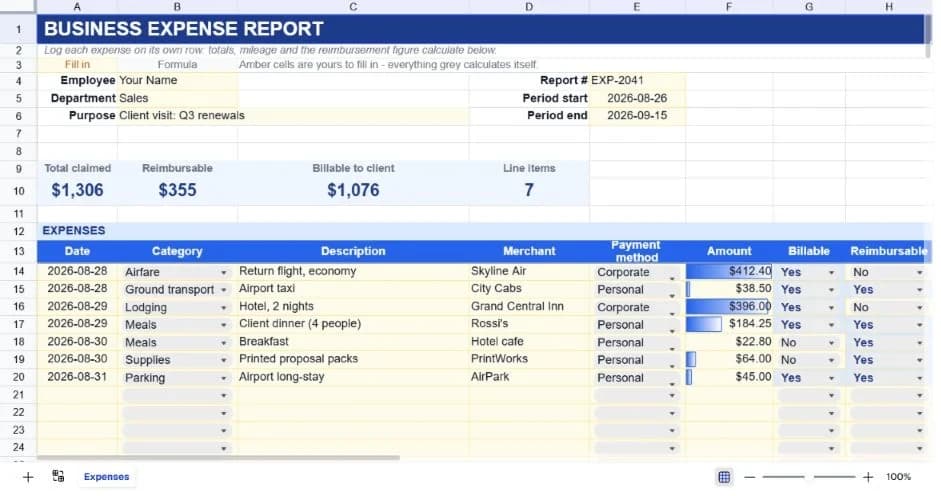
About the business expense report
Expense claims get rejected for boring reasons: the total doesn't add up, mileage is calculated at the wrong rate, or there's no way to tell which lines the client is being billed for. This template removes all three problems by doing the arithmetic itself and asking for the two flags finance always ends up chasing.
Each expense goes on its own row with a date, category, description, merchant and payment method. Two extra columns ask whether the line is billable to a client and whether it's reimbursable to you. The same expense can be one, both or neither, and keeping them separate is what lets the summary answer both questions independently.
Mileage is handled in its own block rather than mixed into the receipt lines, because it's a rate multiplied by a distance rather than a documented purchase, and most finance teams reconcile the two differently. The grand total adds the two together, and an approval block at the bottom gives the form somewhere to be signed.
What’s in the template
Everything below is already built into the file. Open it and it’s there.
Report header
Employee, department, purpose, report number and a period start and end, so the claim is self-describing once it leaves your hands.
Summary strip
Total claimed, reimbursable subtotal, billable-to-client subtotal and a line-item count, each derived from the flags on the rows below.
Twenty-five expense rows
Seven worked examples covering airfare, lodging, meals, transport and supplies, plus formatted blank rows for your own.
Billable and reimbursable flags
Independent Yes/No columns that feed the two summary subtotals, so you can answer what the client owes and what you're owed separately.
Mileage block
Distance times your own rate per mile, kept apart from receipted lines and folded into the grand total.
Approval block
Submitted-by and approved-by lines with dates, so the form carries its own audit trail.
Who it’s for
Employees claiming travel costs
A trip's worth of receipts, mileage and a purpose statement in one document that can be printed or exported and attached to an email.
Consultants rebilling client expenses
The billable flag separates what the client owes from what your own company covers, so one form serves both the invoice and the reimbursement.
Finance teams standardising claims
Hand it out as the required format and the arithmetic errors that make up most rejected claims stop arriving.
Small businesses without expense software
Covers what a dedicated tool would do for a team small enough that per-seat pricing isn't worth it.
How to use the business expense report
- 1
Fill in the header before the trip
Setting the purpose and period up front means you're logging against a defined claim rather than reconstructing one later.
- 2
Add a row per receipt
Log expenses as they happen. The merchant and payment method columns are what let you match lines back to a card statement when finance asks.
- 3
Set both flags on every row
Billable and reimbursable drive the summary subtotals. A blank flag simply isn't counted, which quietly understates the claim.
- 4
Enter mileage last
Put total distance and your organisation's current rate into the mileage block; the grand total picks it up without further editing.
The formulas that ship with it
Every one of these is already in the file. They’re listed so you can see how it works, and change it if you want to.
Reimbursable subtotal
=SUMIF(H14:H38,"Yes",F14:F38)Adds only the rows flagged reimbursable. The billable subtotal uses the same pattern against the other flag column.
Mileage total
=ROUND(A44*B44,2)Distance times rate, rounded to two decimals so the claim doesn't carry fractional pennies into the grand total.
Total claim
=F39+C44Receipt subtotal plus mileage. Deliberately not a sum of everything above, which would double-count the subtotal row.
Line items
=COUNTA(A14:A38)Counts dated rows, giving finance a quick check that the number of lines matches the number of receipts attached.
Tips for getting more out of it
- Check your mileage rate against the current published figure before submitting. Rates change annually in most countries and it's the most common correction.
- Keep the description specific enough to survive an audit. 'Client dinner (4 people)' answers questions that 'dinner' invites.
- An expense can be billable but not reimbursable if it went on a company card. Flagging both columns honestly is what keeps the two subtotals meaningful.
- Export to PDF via Print when you submit, so the approver receives a fixed document rather than an editable sheet.
Ask questions about your data, generate formulas in plain English, and create charts instantly, all on top of the Business Expense Report.
Questions about this template
More finance templates
Personal Budget Tracker
Plan and actual side by side across twelve categories, with your savings rate worked out for you.
Use thisSales Performance Dashboard
Quarterly bookings against annual quota, with attainment and gap-to-target per rep.
Use this13-Week Cash Flow Forecast
Thirteen weeks of receipts and payments, with each week's closing balance rolling into the next.
Use thisSave hours
Skip the setup. Start from a ready-made structure.
Error-free
Pre-tested formulas that just work.
Professional
Designed for real-world use, ready to share.
Consistent
Maintain standards across every document.
Ready to use the Business Expense Report?
No setup, no learning curve, just results. Start free in seconds.
Pay as you go, no subscription required