Agile Sprint Planner
A practical sprint board for teams that want stand-up clarity without a heavyweight tool.
About the agile sprint planner
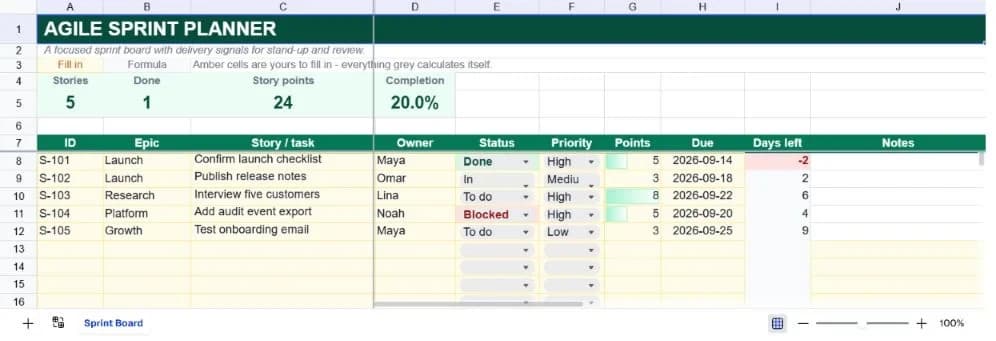
A sprint board should make the next conversation easier. Who owns this story? What is blocked? Are we actually moving toward the sprint goal, or are finished-looking tasks hiding work that has not started? This template keeps those answers in the same compact register, with enough structure for a team and no setup ceremony.
The board includes epics, story IDs, owners, status, priority, story points, due dates, days left, and notes. Five worked examples demonstrate the intended pattern, while blank rows are ready for the rest of the sprint. The KPI strip counts stories, completed stories, total points, and completion percentage automatically.
Amber cells are inputs and grey cells calculate themselves. That distinction matters during a fast stand-up: teammates can update the board quickly while the completion and overdue signals remain protected from accidental edits.
What’s in the template
Everything below is already built into the file. Open it and it’s there.
Sprint KPI strip
Stories, done count, story points, and completion rate update as statuses change.
Story register
ID, epic, story or task, owner, status, priority, points, due date, days left, and notes.
Controlled workflow fields
Status and priority dropdowns prevent small spelling differences from breaking the summary.
Exception highlighting
Blocked work is red, completed work is muted green, and overdue due dates stand out immediately.
Progress data bars
Story points get a simple visual bar so the largest pieces of work are easy to spot.
Two useful variations
Use it for a discovery sprint or release train by changing the status options and due-date horizon.
Who it’s for
Product and engineering squads
Track a two-week sprint, release slice, or maintenance cycle with the fields people actually discuss in stand-up.
Startup teams
Create a shared delivery rhythm before investing in a full project-management platform.
Delivery leads
Use the blocked and overdue highlighting to focus escalation on exceptions rather than reading every row.
Consultants running workshops
Duplicate the board per engagement and give a client a clean view of commitments and progress.
How to use the agile sprint planner
- 1
Write the sprint goal
Use the epics and story column to describe outcomes rather than a long list of vague activities.
- 2
Assign and size the work
Give every row an owner and a point estimate. A blank owner or zero-point task is a useful signal to resolve before commitment.
- 3
Update status during stand-up
Move rows through the four dropdown values. The KPI strip and conditional formatting respond immediately.
- 4
Review exceptions at the end
Filter or scan blocked, overdue, and unfinished work before deciding what rolls into the next cycle.
The formulas that ship with it
Every one of these is already in the file. They’re listed so you can see how it works, and change it if you want to.
Completion rate
=IF(A5=0,0,B5/A5)Completed stories divided by stories with a status. The zero guard keeps a new empty sprint from showing an error.
Days left
=IF(H8="","",H8-TODAY())The due date minus today. Negative values mean the story is overdue and receive the danger format.
Completed stories
=COUNTIF(E8:E37,"Done")Counts the controlled Done value, keeping the headline metric tied to the workflow field rather than row position.
Tips for getting more out of it
- Keep stories small enough to finish inside the sprint. If one row needs several owners, it probably wants to be split.
- Treat Blocked as a request for help, not a permanent status. Add the reason in Notes so the next action is explicit.
- Start by replacing the worked examples, then add rows only when the register's structure is working for your team.
- Keep dropdown labels consistent. The summary formulas deliberately count exact status text so the dashboard stays auditable.
- Use the AI assistant to add a new field, change a weighting, or turn the register into a weekly summary without rebuilding it.
- Duplicate a clean version before each new planning cycle. That gives you a simple record of what the team knew at the time.
Ask questions about your data, generate formulas in plain English, and create charts instantly, all on top of the Agile Sprint Planner.
Questions about this template
More business templates
Project Task Tracker
Owners, due dates and progress per task, plus a live count of what's overdue.
Use thisProfessional Invoice
Fifteen line items with per-line discounts. Subtotal, tax and balance due calculate themselves.
Use thisEmployee Directory & Org Chart
Contact details and reporting lines, with tenure and department headcount derived automatically.
Use thisSave hours
Skip the setup. Start from a ready-made structure.
Error-free
Pre-tested formulas that just work.
Professional
Designed for real-world use, ready to share.
Consistent
Maintain standards across every document.
Ready to use the Agile Sprint Planner?
No setup, no learning curve, just results. Start free in seconds.
Pay as you go, no subscription required