Hiring Pipeline Tracker
Keep every candidate moving with a clear next step, owner, and decision status.
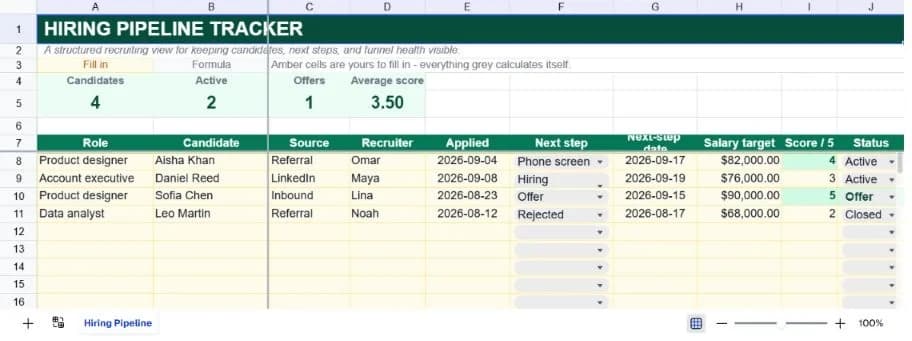
About the hiring pipeline tracker
A hiring pipeline is not just a list of candidates. It is a set of promises about what happens next: who is calling, when the interview is, which role the person is being considered for, and whether the team is still actively investing time. This template makes those commitments visible without requiring a full applicant-tracking system.
Each candidate row includes role, candidate, source, recruiter, application date, next step, next-step date, salary target, interview score, and status. The summary counts the full candidate list, active candidates, offers, and average score. Sample rows show referral, LinkedIn, inbound, and closed outcomes.
Use the workbook for a small team, a single hiring sprint, or a confidential search-specific copy. Keep sensitive information limited to what the recruiting team needs; a pipeline sheet should not become an unprotected personnel file.
What’s in the template
Everything below is already built into the file. Open it and it’s there.
Funnel KPI strip
Candidates, active candidates, offers, and average score provide a quick recruiting pulse.
Candidate register
Role, candidate, source, recruiter, applied date, next step, and next-step date keep ownership explicit.
Compensation context
Salary target is included as a planning field, not as a substitute for an approved compensation record.
Interview score
A 1–5 input with validation makes score comparisons consistent across reviewers.
Pipeline statuses
Active, Offer, Closed, and On hold separate current work from decisions already made.
Confidential-search variation
Duplicate the sheet per role when candidate access needs to be narrower than company-wide recruiting operations.
Who it’s for
Startup hiring teams
Coordinate recruiting before the company needs a full ATS, with one owner and one next step per candidate.
Recruiters and talent partners
Keep multiple open roles visible while preserving source, stage, score, and follow-up information.
Hiring managers
Review the active funnel quickly and arrive at interviews with the next decision already clear.
Operations leads
Use the summary strip to discuss funnel health without manually counting rows before a leadership meeting.
How to use the hiring pipeline tracker
- 1
Create one row per candidate
Use the role column to support multiple openings while keeping each person as a distinct record.
- 2
Assign the next action
A next step and next-step date are more useful than a vague stage alone. If there is no action, decide whether the candidate is On hold or Closed.
- 3
Score consistently
Agree what 1 through 5 means before interviews begin. A score is useful only when reviewers apply the same rubric.
- 4
Review aging and outcomes
Sort by next-step date, clean up stale Active rows, and move closed candidates out of the active funnel without deleting history.
The formulas that ship with it
Every one of these is already in the file. They’re listed so you can see how it works, and change it if you want to.
Active candidates
=COUNTIF(J8:J37,"Active")Counts candidates still receiving recruiting attention and excludes offers and closed outcomes.
Average score
=IFERROR(AVERAGEIF(I8:I37,">0"),0)Averages only positive scores so blank score cells do not drag down the metric before an interview happens.
Offer count
=COUNTIF(J8:J37,"Offer")Counts the controlled Offer status, making the KPI a direct answer to how many candidates are at offer stage.
Tips for getting more out of it
- A candidate with no next-step date is easy to lose. Treat that blank as a workflow exception and resolve it in the next pipeline review.
- Do not put interview notes or protected demographic information in a broadly shared sheet. Link to the approved system of record instead.
- Start by replacing the worked examples, then add rows only when the register's structure is working for your team.
- Keep dropdown labels consistent. The summary formulas deliberately count exact status text so the dashboard stays auditable.
- Use the AI assistant to add a new field, change a weighting, or turn the register into a weekly summary without rebuilding it.
- Duplicate a clean version before each new planning cycle. That gives you a simple record of what the team knew at the time.
Ask questions about your data, generate formulas in plain English, and create charts instantly, all on top of the Hiring Pipeline Tracker.
Questions about this template
More business templates
Project Task Tracker
Owners, due dates and progress per task, plus a live count of what's overdue.
Use thisProfessional Invoice
Fifteen line items with per-line discounts. Subtotal, tax and balance due calculate themselves.
Use thisEmployee Directory & Org Chart
Contact details and reporting lines, with tenure and department headcount derived automatically.
Use thisSave hours
Skip the setup. Start from a ready-made structure.
Error-free
Pre-tested formulas that just work.
Professional
Designed for real-world use, ready to share.
Consistent
Maintain standards across every document.
Ready to use the Hiring Pipeline Tracker?
No setup, no learning curve, just results. Start free in seconds.
Pay as you go, no subscription required