Home Maintenance Tracker
Tell it how often each job repeats and when you last did it, and it works out what's due.
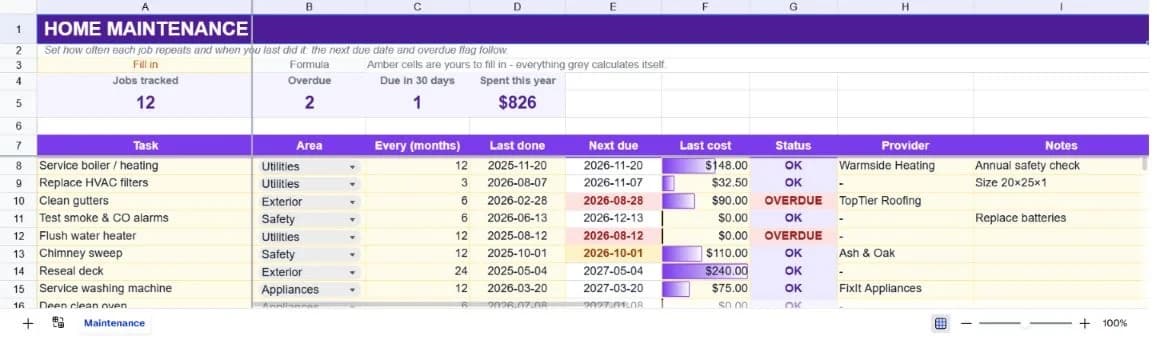
About the home maintenance tracker
Home maintenance fails quietly. Nothing reminds you that the boiler service is eleven months overdue until something stops working, usually in February. This template turns each recurring job into a frequency and a last-done date, and derives the next due date and an overdue flag from them.
Twelve common jobs ship pre-loaded, from boiler servicing and gutter clearing to smoke alarm testing and deck resealing, each with a realistic interval and cost. The summary counts what's overdue, what's due in the next thirty days, and what you've spent across the year.
Next-due dates use month arithmetic rather than adding a fixed number of days, so a twelve-month job done on the 19th falls due on the 19th next year rather than drifting a few days earlier each cycle. Over several years that difference compounds into something genuinely wrong.
What’s in the template
Everything below is already built into the file. Open it and it’s there.
Summary strip
Jobs tracked, how many are overdue, how many fall due in the next thirty days, and total spend across the sheet.
Twelve pre-loaded jobs
Boiler service, HVAC filters, gutters, smoke alarms, water heater, chimney, deck, washing machine, oven, roof, radiators and driveway.
Automatic next-due dates
Derived from the last-done date and the interval in months, using calendar arithmetic rather than a fixed day count.
Overdue flag
Reads OVERDUE once the next-due date has passed, and feeds the count in the summary strip.
Cost and provider columns
What it cost last time and who did it, which together make the next quote easy to sanity-check.
Cost-by-area roll-up
Jobs and spend grouped into utilities, exterior, safety and appliances.
Who it’s for
New homeowners
The twelve pre-loaded jobs are a reasonable starting checklist for anyone who has just discovered how much a house asks of you.
Landlords with a property or two
Safety jobs with statutory intervals (alarms, boiler, chimney) are exactly the ones with an overdue flag worth watching.
Anyone budgeting for upkeep
The cost column and category roll-up turn maintenance from an unpredictable annoyance into a line you can plan for.
People managing a family home together
The provider column records who did it last time, which is the detail nobody can ever remember.
How to use the home maintenance tracker
- 1
Set the interval for each job
In months. Three for filters, twelve for the boiler, twenty-four for resealing. This is what drives everything else.
- 2
Record when you last did it
Estimate if you're not sure. An approximate date produces an approximate next-due date, which is infinitely better than none.
- 3
Update the last-done date after each job
That single edit pushes the next due date forward automatically and clears the overdue flag.
- 4
Check the overdue count monthly
Five seconds, once a month. That's the entire maintenance routine this template is asking for.
The formulas that ship with it
Every one of these is already in the file. They’re listed so you can see how it works, and change it if you want to.
Next due (column E)
=IF(OR(A8="",D8="",C8=""),"",EDATE(D8,C8))Adds the interval in months to the last-done date. EDATE keeps the same day of the month regardless of month length, which adding days does not.
Status (column G)
=IF(E8="","",IF(E8<TODAY(),"OVERDUE","OK"))Compares the next-due date with today. The word OVERDUE is matched literally by the summary count.
Due in thirty days
=COUNTIFS(E8:E47,">="&TODAY(),E8:E47,"<="&TODAY()+30)Two date bounds on the same column, giving you the month ahead rather than only what has already slipped.
Cost by area
=SUMIF($B$8:$B$47,A51,$F$8:$F$47)Totals last-recorded cost per area, which is a rough but useful guide to where the money goes.
Tips for getting more out of it
- Do the safety jobs on schedule regardless of what else slips. Alarms, boiler and chimney are the ones where late has consequences beyond inconvenience.
- Record the cost even when it's zero. A history of zeros tells you which jobs you can keep doing yourself.
- Keep former providers in the sheet rather than overwriting. A good tradesperson from three years ago is worth finding again.
- Group jobs by season and do them in batches. One autumn afternoon covers gutters, roof check and radiator bleeding together.
Ask questions about your data, generate formulas in plain English, and create charts instantly, all on top of the Home Maintenance Tracker.
Questions about this template
More personal templates
Weekly Schedule Planner
Hourly blocks from 6am to 9pm across all seven days, with a habit tracker underneath.
Use thisFitness & Workout Tracker
Sets, reps and weight per exercise, with training volume and a heaviest-set record per lift.
Use thisVacation Planner & Itinerary
Budget, day-by-day itinerary and packing list in one sheet, checked against a spending cap.
Use thisSave hours
Skip the setup. Start from a ready-made structure.
Error-free
Pre-tested formulas that just work.
Professional
Designed for real-world use, ready to share.
Consistent
Maintain standards across every document.
Ready to use the Home Maintenance Tracker?
No setup, no learning curve, just results. Start free in seconds.
Pay as you go, no subscription required