Vacation Planner & Itinerary
Budget, itinerary and packing list in one sheet, with the budget checking itself against your cap.
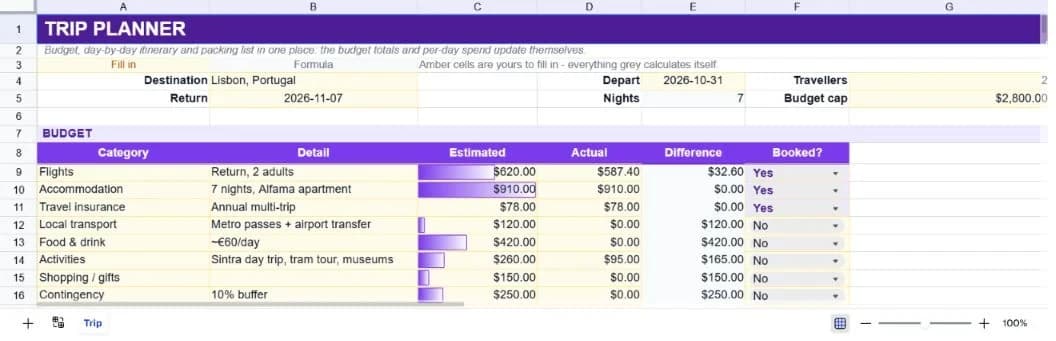
About the vacation planner & itinerary
Trip planning tends to sprawl across a notes app, a spreadsheet and a browser tab full of bookings. This template puts the three parts that actually need to talk to each other in one place: what the trip costs, what you're doing each day, and what needs to be in the bag.
The budget block runs eight categories with estimated and actual columns, a difference column and a booked flag. A line beneath compares the total estimate against a budget cap you set, so going over is a number rather than a feeling. A per-person figure divides by the traveller count.
The itinerary block gives each day a morning, afternoon and evening slot plus a planned spend, and the packing list tracks items by category with a packed count. Seven days of a real Lisbon trip ship as worked examples, which is faster to edit than an empty grid is to fill.
What’s in the template
Everything below is already built into the file. Open it and it’s there.
Trip details block
Destination, departure and return dates, traveller count and budget cap, with nights calculated from the dates.
Eight-category budget
Flights, accommodation, insurance, local transport, food, activities, shopping and contingency, with estimated versus actual and a booked flag.
Budget cap check
Your cap minus the total estimate, so overspend shows as a negative figure before you commit to anything.
Per-person cost
Total divided by traveller count, which is usually the number people actually compare against.
Day-by-day itinerary
Twenty day rows with morning, afternoon and evening slots, a booked flag and a planned daily spend.
Packing checklist
Twenty rows grouped by category with a packed count reading '0 of 10' as you tick items off.
Who it’s for
Anyone planning a trip on a budget
The cap comparison is the point. Knowing you're eight dollars over before you book is worth more than knowing you're four hundred over afterwards.
Couples and families coordinating
One document everyone can read means the itinerary conversation happens once rather than repeatedly.
People planning multi-day city breaks
Morning, afternoon and evening slots are the right resolution for a city trip. Enough structure to book around, not so much that it feels like work.
Anyone who has forgotten a passport
The packing list is grouped by category with documents first, which is the group that actually matters.
How to use the vacation planner & itinerary
- 1
Set the cap before the categories
Decide what the trip is allowed to cost first. Estimating category by category and adding it up at the end almost always lands higher.
- 2
Estimate everything, including contingency
The ten percent buffer row exists because something always comes up. Deleting it doesn't stop that happening.
- 3
Move estimates into actuals as you book
The difference column shows where you're beating or missing the estimate while there's still time to adjust the rest.
- 4
Fill the itinerary loosely
Three slots a day is a frame, not a schedule. Leaving a slot blank is a legitimate plan.
The formulas that ship with it
Every one of these is already in the file. They’re listed so you can see how it works, and change it if you want to.
Nights
=IF(OR(E4="",B5=""),"",B5-E4)Return date minus departure date, blank until both are set. Useful for sanity-checking accommodation costs.
Budget difference
=IF(A9="","",C9-D9)Estimate minus actual per category, so positive means you came in under what you expected to pay.
Versus budget cap
=$G$5-C21Your cap less the total estimate. A negative figure is the amount the plan currently exceeds the cap by.
Packed count
=COUNTIF(C48:C67,"Yes")&" of "&COUNTA(A48:A67)Builds a readable '3 of 10' string by joining a count of packed items to a count of listed ones.
Tips for getting more out of it
- Book the things that get more expensive with time first (flights and accommodation) and leave activities until the budget picture is clear.
- Put a realistic daily food figure in rather than an optimistic one. It's the category that most reliably runs over.
- Fill the packing list a week before, not the night before. The documents category is where the expensive mistakes live.
- Keep the sheet after the trip. Actual costs make the next trip's estimates dramatically better.
Ask questions about your data, generate formulas in plain English, and create charts instantly, all on top of the Vacation Planner & Itinerary.
Questions about this template
More personal templates
Weekly Schedule Planner
Hourly blocks from 6am to 9pm across all seven days, with a habit tracker underneath.
Use thisFitness & Workout Tracker
Sets, reps and weight per exercise, with training volume and a heaviest-set record per lift.
Use thisHome Maintenance Tracker
Set how often each job repeats; next-due dates and overdue flags follow on their own.
Use thisSave hours
Skip the setup. Start from a ready-made structure.
Error-free
Pre-tested formulas that just work.
Professional
Designed for real-world use, ready to share.
Consistent
Maintain standards across every document.
Ready to use the Vacation Planner & Itinerary?
No setup, no learning curve, just results. Start free in seconds.
Pay as you go, no subscription required