Weekly Schedule Planner
Sixteen hours a day across seven days, with the habits you're trying to hold underneath.
About the weekly schedule planner
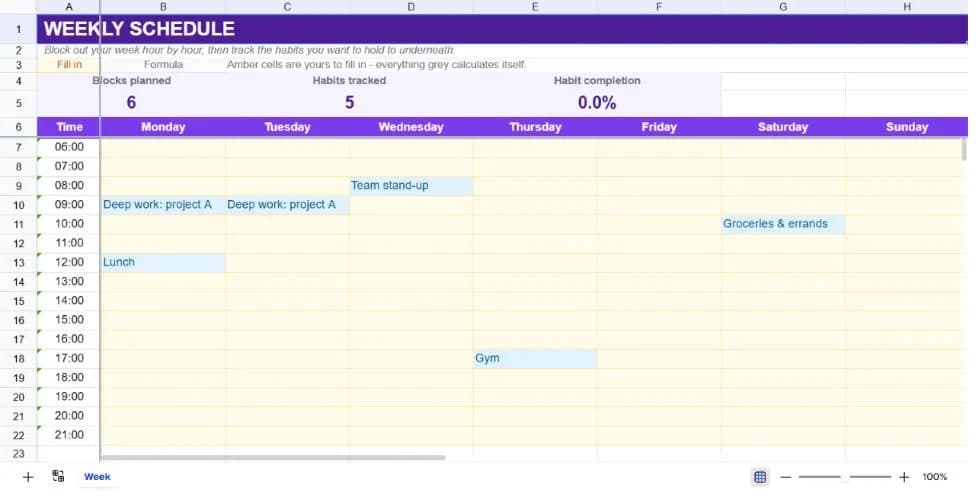
Time blocking works because it forces the question of when something will actually happen, rather than leaving it on a list of things that theoretically could. This template gives you a grid of hourly slots from 6am to 9pm across all seven days, which is enough resolution to plan a week without the grid becoming unreadable.
Underneath the schedule sits a habit tracker: a row per habit and a column per day, with a completion percentage across the top. Marking a habit done is a single character, which is deliberate. Anything more elaborate becomes a task in its own right and gets abandoned.
The two halves work together. The schedule says when you intend to do things; the habit grid says whether you actually did. Keeping them on one sheet means the weekly review is one screen rather than a comparison between two documents.
What’s in the template
Everything below is already built into the file. Open it and it’s there.
Summary strip
Blocks planned, habits tracked and overall habit completion for the week.
Sixteen-hour daily grid
Hourly rows from 6am to 9pm across Monday to Sunday, with a few example blocks showing the intended use.
Habit tracker
Eight rows with a column per day, seeded with five common habits you can replace.
Completion percentage
Marked days as a share of every habit-day in the week, so partial weeks still produce a meaningful figure.
Frozen headers and time column
Day names and hour labels stay visible as you scroll through the grid.
Wide day columns
Sized to hold a real activity description rather than truncating after two words.
Who it’s for
Anyone trying time blocking
A pre-built grid removes the setup that usually stops people trying the technique in the first place.
Students planning around classes
Fixed commitments go in first, and the empty blocks show honestly how much study time actually exists.
Remote workers structuring the day
Without an office rhythm, blocking deep work explicitly is most of what keeps a week from dissolving.
People building habits
The tracker gives a completion percentage rather than a streak, which survives one missed day without feeling like failure.
How to use the weekly schedule planner
- 1
Block fixed commitments first
Meetings, classes, school runs. Anything you don't control. What remains is your actual discretionary time, which is usually less than it feels.
- 2
Add deep work before filling gaps
Put the two or three blocks that matter most into your best hours, then let smaller things fill around them.
- 3
Mark habits with a lower-case x
The completion figure counts that character specifically. A tick or a Y won't register.
- 4
Review on Sunday
Compare what you blocked against what the habit grid says happened. The gap is the useful information.
The formulas that ship with it
Every one of these is already in the file. They’re listed so you can see how it works, and change it if you want to.
Habit completion
=IF(COUNTA(A27:A34)=0,0,COUNTIF(B27:H34,"x")/(COUNTA(A27:A34)*7))Marked days divided by total possible habit-days. The denominator scales with how many habits you're actually tracking.
Blocks planned
=COUNTA(B7:H22)Counts every filled cell in the schedule grid, a rough measure of how committed the week already is.
Tips for getting more out of it
- Leave gaps on purpose. A fully blocked week has no capacity for the thing that comes up, and something always comes up.
- Block recovery as deliberately as work. Unblocked evenings are how blocked days become unsustainable.
- Three to five habits is the working range. Eight rows exist because the grid needs room, not because you should fill them.
- If a block repeatedly doesn't happen at its scheduled time, move it rather than trying harder; the slot is usually wrong.
Ask questions about your data, generate formulas in plain English, and create charts instantly, all on top of the Weekly Schedule Planner.
Questions about this template
More personal templates
Fitness & Workout Tracker
Sets, reps and weight per exercise, with training volume and a heaviest-set record per lift.
Use thisVacation Planner & Itinerary
Budget, day-by-day itinerary and packing list in one sheet, checked against a spending cap.
Use thisHome Maintenance Tracker
Set how often each job repeats; next-due dates and overdue flags follow on their own.
Use thisSave hours
Skip the setup. Start from a ready-made structure.
Error-free
Pre-tested formulas that just work.
Professional
Designed for real-world use, ready to share.
Consistent
Maintain standards across every document.
Ready to use the Weekly Schedule Planner?
No setup, no learning curve, just results. Start free in seconds.
Pay as you go, no subscription required