Fitness & Workout Tracker
Volume per exercise and a personal best per lift, calculated as you log.
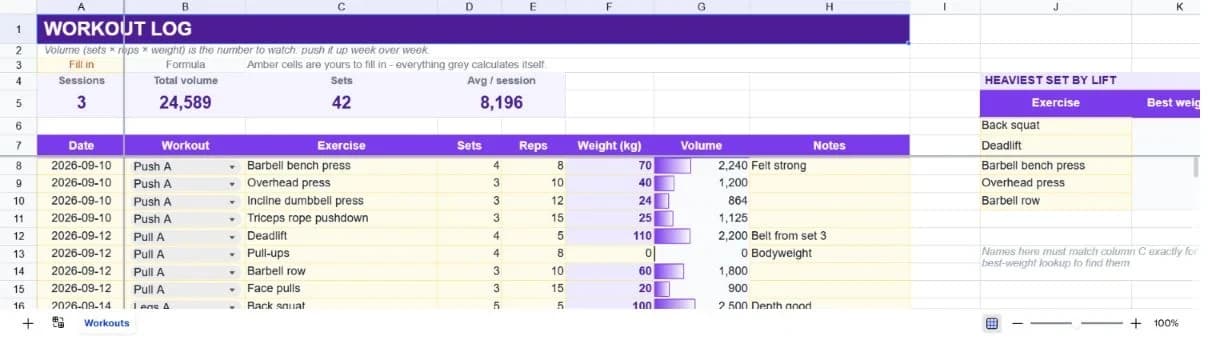
About the fitness & workout tracker
Progressive overload is the whole mechanism behind strength training, and it depends on knowing what you did last time. This log makes that automatic: each row records sets, reps and weight, and the volume column multiplies them so you can compare sessions on one number instead of three.
Sessions are grouped by date, and the summary counts distinct dates rather than rows, so twelve exercises across three gym visits reads as three sessions and not twelve. Total volume, total sets and average volume per session sit alongside it.
A personal-best panel to the right tracks your heaviest recorded set for five named lifts. It's driven off the exercise column, so as long as you name a lift consistently it maintains itself and you never have to remember what your squat top set was.
What’s in the template
Everything below is already built into the file. Open it and it’s there.
Summary strip
Sessions logged, total volume, sets completed and average volume per session.
Eighty-row training log
Twelve worked rows covering three sessions of a push/pull/legs split, with forty more rows pre-formatted.
Automatic volume column
Sets times reps times weight, per exercise row: the single number that makes two sessions comparable.
Personal-best panel
Heaviest recorded set for five named lifts, maintained automatically from the log.
Distinct session counting
Counts unique dates rather than rows, so a twelve-exercise week reads as three sessions.
Notes column
Where 'belt from set 3' and 'depth good' live: the context that makes a number mean something six weeks later.
Who it’s for
Lifters running a structured programme
Push, pull and legs splits are already in the sample data, and the volume column is the metric most programmes progress on.
Anyone returning after a break
The personal-best panel tells you where you were, which is the number that makes coming back a plan rather than a guess.
People coached remotely
Export the sheet and a coach has the full picture (sets, reps, load and notes) without a subscription to a shared app.
Anyone who forgets last week's weights
That's the actual problem this solves. Everything else on the sheet is a consequence of it.
How to use the fitness & workout tracker
- 1
Log during the session
One row per exercise, filled in between sets. Reconstructing afterwards is where accuracy goes.
- 2
Name exercises consistently
The personal-best panel matches exercise names exactly. 'Back squat' and 'Squat' are two different lifts as far as it's concerned.
- 3
Record bodyweight work as zero
Pull-ups at zero produce zero volume, which understates them. Either enter your bodyweight or accept that volume covers loaded work only.
- 4
Compare volume week to week
Same exercise, same time next week, slightly higher volume. That's the whole method, and the column makes it a glance.
The formulas that ship with it
Every one of these is already in the file. They’re listed so you can see how it works, and change it if you want to.
Volume (column G)
=IF(C8="","",D8*E8*F8)Sets times reps times weight. Blank exercise rows stay blank rather than contributing a zero.
Sessions logged
=SUMPRODUCT((A8:A87<>"")/COUNTIF(A8:A87,A8:A87&""))Counts distinct dates rather than rows. The standard distinct-count pattern, so twelve exercises across three days reads as three.
Heaviest set per lift
=IF(COUNTIF($C$8:$C$87,J6)=0,"",MAXIFS($F$8:$F$87,$C$8:$C$87,J6))The largest weight recorded for a named exercise, blank until that lift appears in the log.
Tips for getting more out of it
- Volume is a good proxy, not the goal. Three sets of five heavy beats five sets of three light for strength, even at identical volume.
- Log the sets you actually completed, not the ones the programme prescribed. A log that flatters you is worth nothing.
- Add your own lifts to the personal-best panel by typing the exercise name into the left column; the formula follows.
- Once you have a few weeks in, ask the assistant to chart volume by week for a single exercise.
Ask questions about your data, generate formulas in plain English, and create charts instantly, all on top of the Fitness & Workout Tracker.
Questions about this template
More personal templates
Weekly Schedule Planner
Hourly blocks from 6am to 9pm across all seven days, with a habit tracker underneath.
Use thisVacation Planner & Itinerary
Budget, day-by-day itinerary and packing list in one sheet, checked against a spending cap.
Use thisHome Maintenance Tracker
Set how often each job repeats; next-due dates and overdue flags follow on their own.
Use thisSave hours
Skip the setup. Start from a ready-made structure.
Error-free
Pre-tested formulas that just work.
Professional
Designed for real-world use, ready to share.
Consistent
Maintain standards across every document.
Ready to use the Fitness & Workout Tracker?
No setup, no learning curve, just results. Start free in seconds.
Pay as you go, no subscription required