Marketing Campaign Planner
Coordinate the plan and the performance readout in one campaign-level view.
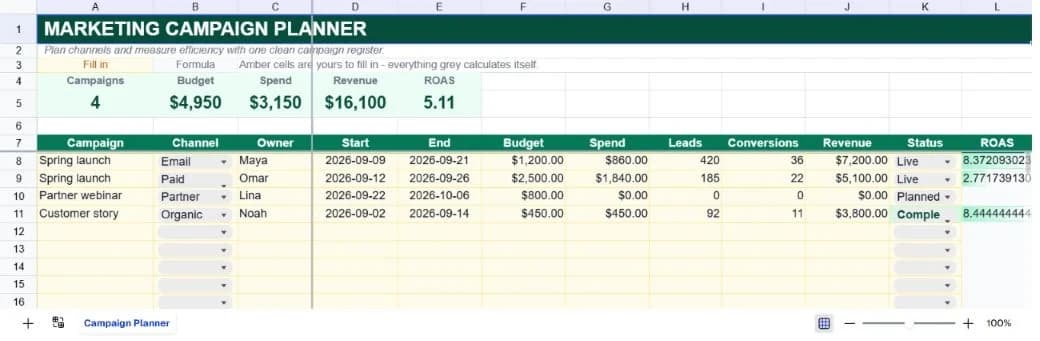
About the marketing campaign planner
Campaign calendars and performance reports often drift apart. One tells the team what is supposed to happen; the other explains what happened after the budget was spent. This template makes the campaign the unit of planning, so dates, ownership, investment, outcomes, and status can be reviewed together.
Each row captures a campaign and channel, owner, start and end dates, budget, spend, leads, conversions, revenue, status, and calculated ROAS. Four examples cover email, paid search, partner, and organic work. Add rows for the campaigns you actually run, not every individual ad or social post.
The workbook is deliberately channel-neutral. It works for a quarterly demand-generation plan, a product launch, an events calendar, or a small ecommerce promotion. The variation is in the row grain: keep one row per campaign for executive review, or duplicate by channel for weekly optimisation.
What’s in the template
Everything below is already built into the file. Open it and it’s there.
Campaign KPI strip
Campaign count, budget, spend, revenue, and blended ROAS are calculated from the register.
Channel planning fields
Campaign, channel, owner, start date, and end date give the calendar operational context.
Performance fields
Leads, conversions, and revenue allow a simple funnel and return review alongside the plan.
Status controls
Planned, Live, Complete, and Paused make the lifecycle visible and keep reporting consistent.
ROAS visual
A data bar helps high-return campaigns stand out while preserving the exact calculated value.
Weekly channel variation
Duplicate campaigns by channel or reporting week when the portfolio view is not detailed enough.
Who it’s for
Marketing managers
Maintain a reliable campaign plan with owners, dates, budgets, and a performance snapshot that is ready for review.
Growth teams
Compare channels by spend efficiency without rebuilding a report every week.
Founders
See where budget is going and whether revenue is following without opening five platform dashboards.
Agencies
Duplicate the planner for each client or keep accounts together for a quarterly allocation conversation.
How to use the marketing campaign planner
- 1
Set the campaign grain
Decide whether a row means a campaign, channel, or campaign-week before filling the sheet. Consistency makes comparisons useful.
- 2
Plan the work
Enter owner, start, end, budget, and status before launch. The team should be able to see what is coming next.
- 3
Update performance
Bring spend, leads, conversions, and revenue into the same row on a weekly cadence.
- 4
Reallocate intentionally
Use ROAS as a signal, not a verdict. Check conversion quality and timing before moving budget between channels.
The formulas that ship with it
Every one of these is already in the file. They’re listed so you can see how it works, and change it if you want to.
Campaign ROAS
=IF(G8=0,"",J8/G8)Revenue divided by spend. Blank spend produces a blank ROAS so planned campaigns do not look like zero-return campaigns.
Blended ROAS
=IF(C5=0,0,D5/C5)Total revenue divided by total spend from the KPI strip, giving the portfolio-level return.
Campaign count
=COUNTIF(K8:K32,"<>")Counts populated status cells so a campaign is included once it has a lifecycle status.
Tips for getting more out of it
- Use one attribution convention for revenue across the sheet. Mixing first-touch and last-touch results makes ROAS comparisons misleading.
- A campaign with no spend yet should remain blank, not zero, because it has not had a fair chance to produce a return.
- Start by replacing the worked examples, then add rows only when the register's structure is working for your team.
- Keep dropdown labels consistent. The summary formulas deliberately count exact status text so the dashboard stays auditable.
- Use the AI assistant to add a new field, change a weighting, or turn the register into a weekly summary without rebuilding it.
- Duplicate a clean version before each new planning cycle. That gives you a simple record of what the team knew at the time.
Ask questions about your data, generate formulas in plain English, and create charts instantly, all on top of the Marketing Campaign Planner.
Questions about this template
More business templates
Project Task Tracker
Owners, due dates and progress per task, plus a live count of what's overdue.
Use thisProfessional Invoice
Fifteen line items with per-line discounts. Subtotal, tax and balance due calculate themselves.
Use thisEmployee Directory & Org Chart
Contact details and reporting lines, with tenure and department headcount derived automatically.
Use thisSave hours
Skip the setup. Start from a ready-made structure.
Error-free
Pre-tested formulas that just work.
Professional
Designed for real-world use, ready to share.
Consistent
Maintain standards across every document.
Ready to use the Marketing Campaign Planner?
No setup, no learning curve, just results. Start free in seconds.
Pay as you go, no subscription required