OKR Planning & Tracking
Progress scored from a baseline, so a key result that starts at 62% doesn't read as already done.
About the okr planning & tracking
The usual mistake in an OKR spreadsheet is scoring progress as current divided by target. If a key result moves ticket resolution from 62% to 90%, that formula reports 69% progress on day one, before anything has happened. This template scores against the baseline instead, so progress starts at zero and reaching the target is what produces 100%.
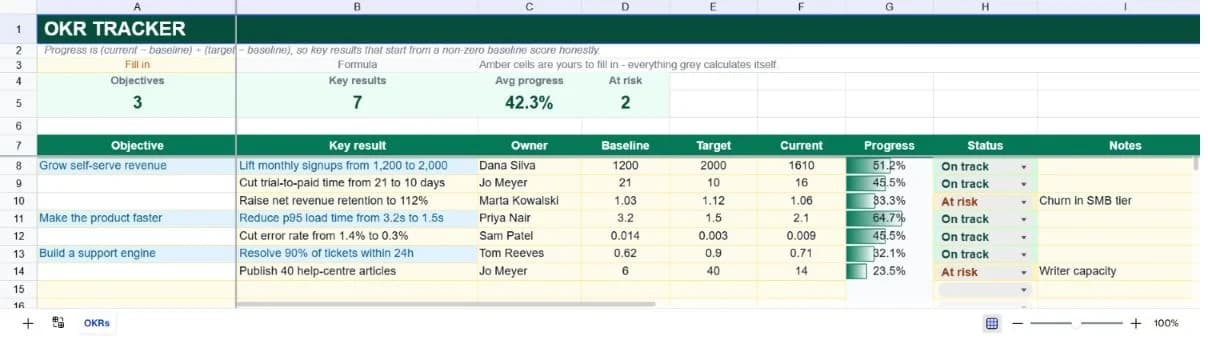
Each row is a key result with an owner, a baseline, a target and a current value. Objectives sit in the left-hand column and are written once, with the key results beneath them left blank in that column, which is what lets the summary count objectives and key results separately from the same table.
The same baseline-relative formula handles metrics where lower is better without any extra configuration. Cutting error rate from 1.4% to 0.3% and raising retention from 103% to 112% both score correctly, because dividing by target-minus-baseline flips the sign automatically when the target sits below the starting point.
What’s in the template
Everything below is already built into the file. Open it and it’s there.
Summary strip
Objective count, key result count, average progress and a count of key results flagged at risk.
Thirty key result rows
Seven examples across three objectives, covering revenue, speed and support goals, plus formatted blank rows.
Baseline, target and current columns
Three inputs per key result. The baseline is what makes honest scoring possible and is the column most OKR templates leave out.
Automatic progress scoring
Clamped between 0% and 100%, so a key result that has gone backwards reads as zero rather than a negative number.
Status and notes columns
On track, At risk, Off track and Done, with a notes column for the reason a key result slipped.
Quarter block
A quarter label and end date at the bottom, so a sheet found six months later still says what period it covered.
Who it’s for
Teams running quarterly OKRs
Covers a full quarter's objectives on one sheet, with a status column and an at-risk count for the mid-quarter check-in.
Startups introducing goal-setting
Seven worked key results across three objectives show what a well-formed, measurable key result looks like, usually the hardest part of adopting OKRs.
Managers tracking team goals
The owner column makes accountability explicit, and the average-progress figure gives you one number for a skip-level update.
Anyone whose OKR tool is overkill
If you have nine key results, a spreadsheet is the right tool and a dedicated platform is a subscription you don't need.
How to use the okr planning & tracking
- 1
Write the objective first
Put it in column A on the first row of its group and leave column A blank for the key results below it. That grouping is what the objective count relies on.
- 2
Record the baseline before the quarter starts
The baseline is where the metric stood on day one. Recording it after work has begun quietly inflates every progress figure that follows.
- 3
Update current values weekly
Only the current column needs touching during the quarter. Progress and the summary follow from it.
- 4
Set status by judgement, not by the number
Progress is arithmetic; status is a human call. A key result at 40% in week ten is at risk even though the number alone doesn't say so.
The formulas that ship with it
Every one of these is already in the file. They’re listed so you can see how it works, and change it if you want to.
Progress (column G)
=IF(OR(B8="",E8=D8),"",MAX(0,MIN(1,(F8-D8)/(E8-D8))))Progress from baseline toward target, clamped to 0–100%. Works unchanged when the target is lower than the baseline, because the denominator goes negative too.
Objectives count
=COUNTA(A8:A37)Counts only the rows where an objective is written, which is why key results leave that column blank.
At-risk count
=COUNTIF(H8:H37,"At risk")A literal match on the status column: the value that usually drives the mid-quarter conversation.
Tips for getting more out of it
- A key result without a number isn't a key result. If you can't write a baseline and a target, it's a task and belongs on the project tracker instead.
- Three to five key results per objective is the working range. Beyond that, the average progress figure stops meaning anything.
- Set targets you'd expect to land around 70% of the time. Consistently hitting 100% usually means the targets were safe rather than the execution exceptional.
- Review status weekly and progress monthly. The number moves slowly; the judgement about whether you'll get there moves fast.
Ask questions about your data, generate formulas in plain English, and create charts instantly, all on top of the OKR Planning & Tracking.
Questions about this template
More business templates
Project Task Tracker
Owners, due dates and progress per task, plus a live count of what's overdue.
Use thisProfessional Invoice
Fifteen line items with per-line discounts. Subtotal, tax and balance due calculate themselves.
Use thisEmployee Directory & Org Chart
Contact details and reporting lines, with tenure and department headcount derived automatically.
Use thisSave hours
Skip the setup. Start from a ready-made structure.
Error-free
Pre-tested formulas that just work.
Professional
Designed for real-world use, ready to share.
Consistent
Maintain standards across every document.
Ready to use the OKR Planning & Tracking?
No setup, no learning curve, just results. Start free in seconds.
Pay as you go, no subscription required