Personal Expense Tracker
Log what you spend; the category breakdown assembles itself as you go.
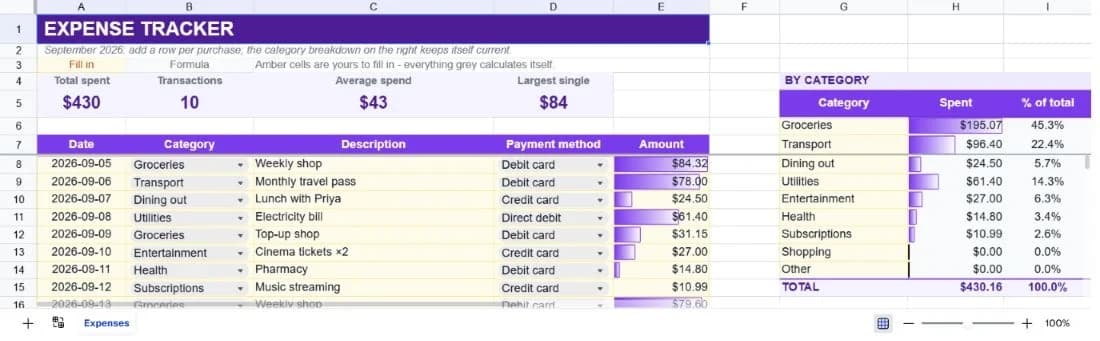
About the personal expense tracker
A budget tells you what you meant to spend. An expense tracker tells you what you did. This template is the second one: a plain ledger where each purchase is a row, sitting beside a category breakdown that totals itself as the ledger grows.
Each entry takes a date, category, description, payment method and amount. That's deliberately few fields: the more a tracker asks for, the less likely you are to still be using it in March. The breakdown on the right covers nine common categories and shows both the amount and the share of total spend for each.
Four figures sit across the top: total spent, number of transactions, average transaction and largest single purchase. The last one is often the most useful, since a month's overspend is frequently one purchase rather than a pattern.
What’s in the template
Everything below is already built into the file. Open it and it’s there.
Summary strip
Total spent, transaction count, average spend per transaction and the largest single purchase.
Hundred-row ledger
Ten worked examples covering a fortnight of ordinary spending, with the next thirty rows pre-formatted for you.
Nine-category breakdown
Groceries, transport, dining out, utilities, entertainment, health, subscriptions, shopping and other, each with amount and share of total.
Payment method column
Debit card, credit card, direct debit, cash. Enough to reconcile the ledger against a statement later.
Frozen header row
Column headings stay visible however far down the ledger you scroll.
Percentage of total column
The number that makes categories comparable, which raw amounts across an uneven month don't.
Who it’s for
Anyone who doesn't know where the money goes
Start by logging for a month without changing anything. The category breakdown usually answers the question on its own.
People who found budgeting apps too much
No bank connection, no categorisation rules to correct, no notifications. Five fields per row and nothing else.
Couples tracking shared spending
The payment method column doubles as a who-paid column, which is enough to settle up at month end.
Anyone preparing for a budget
Track actual spend for a month first, then use the category totals to set realistic figures in the budget template.
How to use the personal expense tracker
- 1
Log the same day
Reconstructing a week from memory is where most trackers die. Thirty seconds after each purchase is the habit that sticks.
- 2
Use the exact category names
The breakdown matches on text. Typing Food when the list says Groceries means that spend never appears in the summary.
- 3
Keep descriptions specific
'Weekly shop' beats 'shopping' when you're reviewing three months later and trying to remember what happened.
- 4
Review the breakdown weekly
The percentage column is where the surprise usually is. Reviewing weekly leaves time to change the month; reviewing monthly doesn't.
The formulas that ship with it
Every one of these is already in the file. They’re listed so you can see how it works, and change it if you want to.
Category spend
=SUMIF($B$8:$B$107,G6,$E$8:$E$107)Adds every ledger amount whose category matches this row, across the full hundred-row range so late entries are included.
Average spend
=IF(COUNT(E8:E107)=0,0,AVERAGE(E8:E107))Guarded with COUNT, because averaging an entirely empty column returns a divide-by-zero rather than zero.
Largest single purchase
=IF(COUNT(E8:E107)=0,0,MAX(E8:E107))Often the most informative number on the sheet. A bad month is frequently one purchase, not a habit.
Share of total
=IF($A$5=0,"",H6/$A$5)Each category as a percentage of everything logged, referencing the summary total so it stays correct as the ledger grows.
Tips for getting more out of it
- Log everything for the first month, including small cash purchases. The categories you'd have guessed are rarely the ones that dominate.
- If you need a category that isn't listed, add it to the breakdown block as well as using it in the ledger. The total only counts categories that appear in both.
- Don't categorise while you're spending. Log the amount and description immediately, and tidy categories once a week.
- Once you have a month of data, ask the assistant which category grew most week over week.
Ask questions about your data, generate formulas in plain English, and create charts instantly, all on top of the Personal Expense Tracker.
Questions about this template
More personal templates
Weekly Schedule Planner
Hourly blocks from 6am to 9pm across all seven days, with a habit tracker underneath.
Use thisFitness & Workout Tracker
Sets, reps and weight per exercise, with training volume and a heaviest-set record per lift.
Use thisVacation Planner & Itinerary
Budget, day-by-day itinerary and packing list in one sheet, checked against a spending cap.
Use thisSave hours
Skip the setup. Start from a ready-made structure.
Error-free
Pre-tested formulas that just work.
Professional
Designed for real-world use, ready to share.
Consistent
Maintain standards across every document.
Ready to use the Personal Expense Tracker?
No setup, no learning curve, just results. Start free in seconds.
Pay as you go, no subscription required