Vendor Scorecard & Renewal Planner
Turn renewal decisions into a consistent review of performance, spend, and risk.
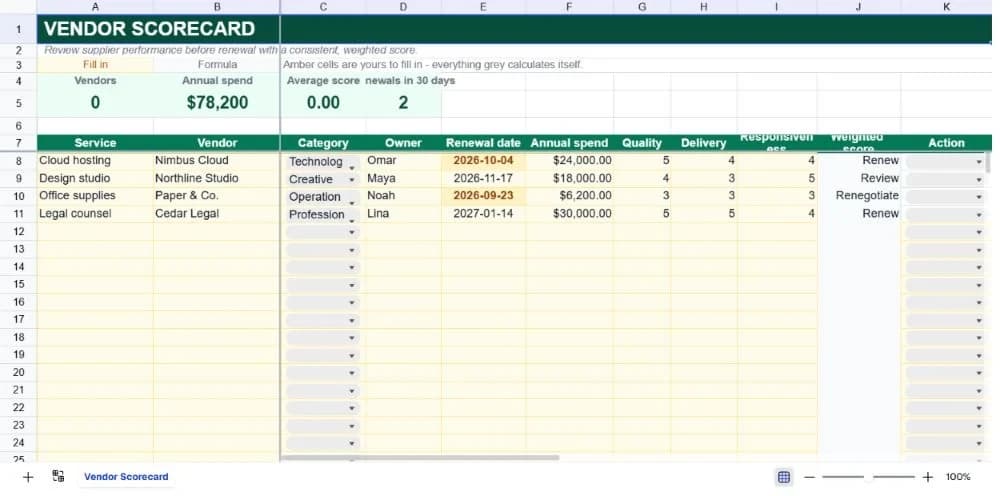
About the vendor scorecard & renewal planner
Supplier renewals are often decided by memory: the last incident, the last invoice, or the person who happens to own the relationship. A scorecard creates a calmer decision surface. It puts performance evidence, annual spend, renewal timing, and the action you want to take in one place before the deadline arrives.
The template scores quality, delivery, and responsiveness on a 1–5 scale. A weighted score gives quality 40 percent, delivery 35 percent, and responsiveness 25 percent. Those weights are visible in the formula and easy to change if your procurement policy values delivery or service more heavily.
The sample vendors cover technology, creative, operations, and professional services. Use the register for a small supplier portfolio, duplicate it by category for a quarterly review, or ask SheetAI to add contract owner, insurance expiry, risk notes, or savings targets.
What’s in the template
Everything below is already built into the file. Open it and it’s there.
Renewal KPI strip
Vendor count, annual spend, average weighted score, and renewals in the next 30 days are calculated for you.
Supplier register
Service, vendor, category, owner, renewal date, annual spend, three ratings, weighted score, and action.
Transparent weighting
Quality, delivery, and responsiveness weights are written directly in the score formula for easy audit and change.
Renewal warning
Renewal dates within the next 30 days receive a warning format so a decision is not left until the final week.
Action dropdown
Renew, Review, Renegotiate, and Replace turn a score into an explicit next decision.
Policy variations
Change weights, add a risk column, or duplicate by category for a more specialised procurement review.
Who it’s for
Operations teams
Keep supplier owners, renewal dates, and performance ratings ready for a monthly operating review.
Procurement leads
Apply a repeatable weighting instead of making each renewal decision from a different set of criteria.
Finance partners
See annual spend beside supplier performance so cost and service are considered together.
Small businesses
Create a practical vendor review process before adopting a full procurement suite.
How to use the vendor scorecard & renewal planner
- 1
List the active supplier set
Include vendors with meaningful spend or operational dependency. Keep the category names consistent so the register can be filtered.
- 2
Agree the rating rubric
Define what a 1, 3, and 5 mean for each criterion. That makes the numbers defensible when a renewal is challenged.
- 3
Review before renewal
Use the 30-day KPI and warning highlight to bring owners into the decision early enough to negotiate or replace.
- 4
Record the action
Select Renew, Review, Renegotiate, or Replace and add any next detail in a new Notes column if the decision needs an audit trail.
The formulas that ship with it
Every one of these is already in the file. They’re listed so you can see how it works, and change it if you want to.
Weighted score
=IF(B8="","",ROUND(G8*0.4+H8*0.35+I8*0.25,2))Combines the three 1–5 ratings into a score that reflects the chosen procurement priorities.
Renewals in 30 days
=COUNTIFS(E8:E32,">="&TODAY(),E8:E32,"<="&TODAY()+30)Counts renewal dates from today through the next 30 days so the team can start the conversation on time.
Average score
=IFERROR(AVERAGE(J8:J32),0)Shows the portfolio's average weighted performance while returning zero for a new empty register.
Tips for getting more out of it
- A score is a prompt for a conversation, not an automatic replacement decision. Add context when a low score has a known temporary cause.
- Review the weights annually. Your business may care more about continuity, security, or delivery as it grows.
- Start by replacing the worked examples, then add rows only when the register's structure is working for your team.
- Keep dropdown labels consistent. The summary formulas deliberately count exact status text so the dashboard stays auditable.
- Use the AI assistant to add a new field, change a weighting, or turn the register into a weekly summary without rebuilding it.
- Duplicate a clean version before each new planning cycle. That gives you a simple record of what the team knew at the time.
Ask questions about your data, generate formulas in plain English, and create charts instantly, all on top of the Vendor Scorecard & Renewal Planner.
Questions about this template
More business templates
Project Task Tracker
Owners, due dates and progress per task, plus a live count of what's overdue.
Use thisProfessional Invoice
Fifteen line items with per-line discounts. Subtotal, tax and balance due calculate themselves.
Use thisEmployee Directory & Org Chart
Contact details and reporting lines, with tenure and department headcount derived automatically.
Use thisSave hours
Skip the setup. Start from a ready-made structure.
Error-free
Pre-tested formulas that just work.
Professional
Designed for real-world use, ready to share.
Consistent
Maintain standards across every document.
Ready to use the Vendor Scorecard & Renewal Planner?
No setup, no learning curve, just results. Start free in seconds.
Pay as you go, no subscription required