Zero-Based Business Budget
Make every dollar accountable before the month begins, then let the variance tell you what changed.
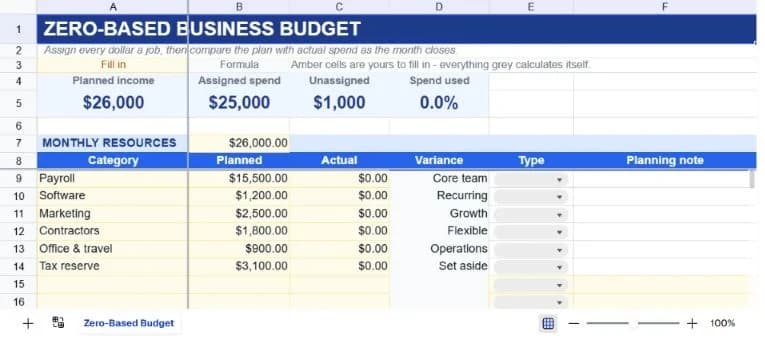
About the zero-based business budget
A conventional budget often starts with last month and adds a percentage. A zero-based budget starts with a more useful question: what does every dollar need to do this month? That makes the plan easier to defend, especially for a small business where payroll, growth, reserves, and flexible spending compete for the same cash.
The sheet gives you a planned income resource, then a line for every assigned category. Enter the planned amount, actual spend, type, and a short planning note. The dashboard shows planned income, assigned spend, unassigned cash, and spend used, while the variance column distinguishes savings from overspend.
This is a business-ready starting point with sample categories for payroll, software, marketing, contractors, operations, and tax reserve. The same structure can be adapted to a household budget simply by replacing the category labels and resource amount.
What’s in the template
Everything below is already built into the file. Open it and it’s there.
Resource line
One clear input for planned monthly income or available cash, used as the budget's starting point.
Category register
Planned, actual, variance, type, and planning note columns support a useful review without excess accounting jargon.
Unassigned cash KPI
Planned income less assigned spend shows whether every dollar has a job or whether the plan needs another decision.
Core, growth, flexible, reserve types
A controlled classification makes it easier to discuss what can move when revenue changes.
Actual-spend data bars
The biggest actual categories stand out visually before you sort or build a chart.
Personal and nonprofit variations
The layout works for household planning, grant-funded programs, or a simple department budget with new labels.
Who it’s for
Founders and operators
Plan a month with explicit trade-offs rather than inheriting an old budget that no longer reflects the business.
Small finance teams
Create a lightweight operating budget with enough structure for an owner review and a month-end variance conversation.
Agencies and studios
Separate core commitments, growth experiments, flexible spend, and reserves before cash is allocated.
Households wanting a variation
Replace the business categories with housing, food, transport, goals, and discretionary spending for a personal version.
How to use the zero-based business budget
- 1
Set the resource amount
Enter the income or cash available for the month in the highlighted resource cell. Use a conservative number if revenue is uncertain.
- 2
Assign every dollar
Add categories until Unassigned reaches zero or until the remaining amount has an explicit reserve purpose.
- 3
Classify the trade-offs
Use the Type dropdown to distinguish commitments from discretionary or growth spending.
- 4
Close the month
Enter actuals, read the variance column, and carry the learning into a fresh copy for the next period.
The formulas that ship with it
Every one of these is already in the file. They’re listed so you can see how it works, and change it if you want to.
Unassigned cash
=A5-B5Planned income less assigned spend. A positive figure needs a job; a negative figure means the plan is over-allocated.
Category variance
=IF(A9="","",B9-C9)Planned less actual spend. Positive is under plan and negative is overspend, which is highlighted in red.
Spend used
=IF(B5=0,0,SUM(C9:C28)/B5)Actual spend divided by assigned spend, guarded against a zero plan so a new budget opens cleanly.
Tips for getting more out of it
- Give reserves a category instead of pretending the money is unallocated. A named reserve is a decision; an unexplained surplus is not.
- Use the planning note for the assumption behind a number, such as an annual renewal or a campaign launch, so the next review has context.
- Start by replacing the worked examples, then add rows only when the register's structure is working for your team.
- Keep dropdown labels consistent. The summary formulas deliberately count exact status text so the dashboard stays auditable.
- Use the AI assistant to add a new field, change a weighting, or turn the register into a weekly summary without rebuilding it.
- Duplicate a clean version before each new planning cycle. That gives you a simple record of what the team knew at the time.
Ask questions about your data, generate formulas in plain English, and create charts instantly, all on top of the Zero-Based Business Budget.
Questions about this template
More finance templates
Personal Budget Tracker
Plan and actual side by side across twelve categories, with your savings rate worked out for you.
Use thisSales Performance Dashboard
Quarterly bookings against annual quota, with attainment and gap-to-target per rep.
Use thisBusiness Expense Report
Receipts, mileage and approvals on one form, with separate billable and reimbursable totals.
Use thisSave hours
Skip the setup. Start from a ready-made structure.
Error-free
Pre-tested formulas that just work.
Professional
Designed for real-world use, ready to share.
Consistent
Maintain standards across every document.
Ready to use the Zero-Based Business Budget?
No setup, no learning curve, just results. Start free in seconds.
Pay as you go, no subscription required