Here is the entire prompt. No follow-ups, no formatting instructions, no example rows.
Build a simple monthly budget tracker with income, expenses, and totals.
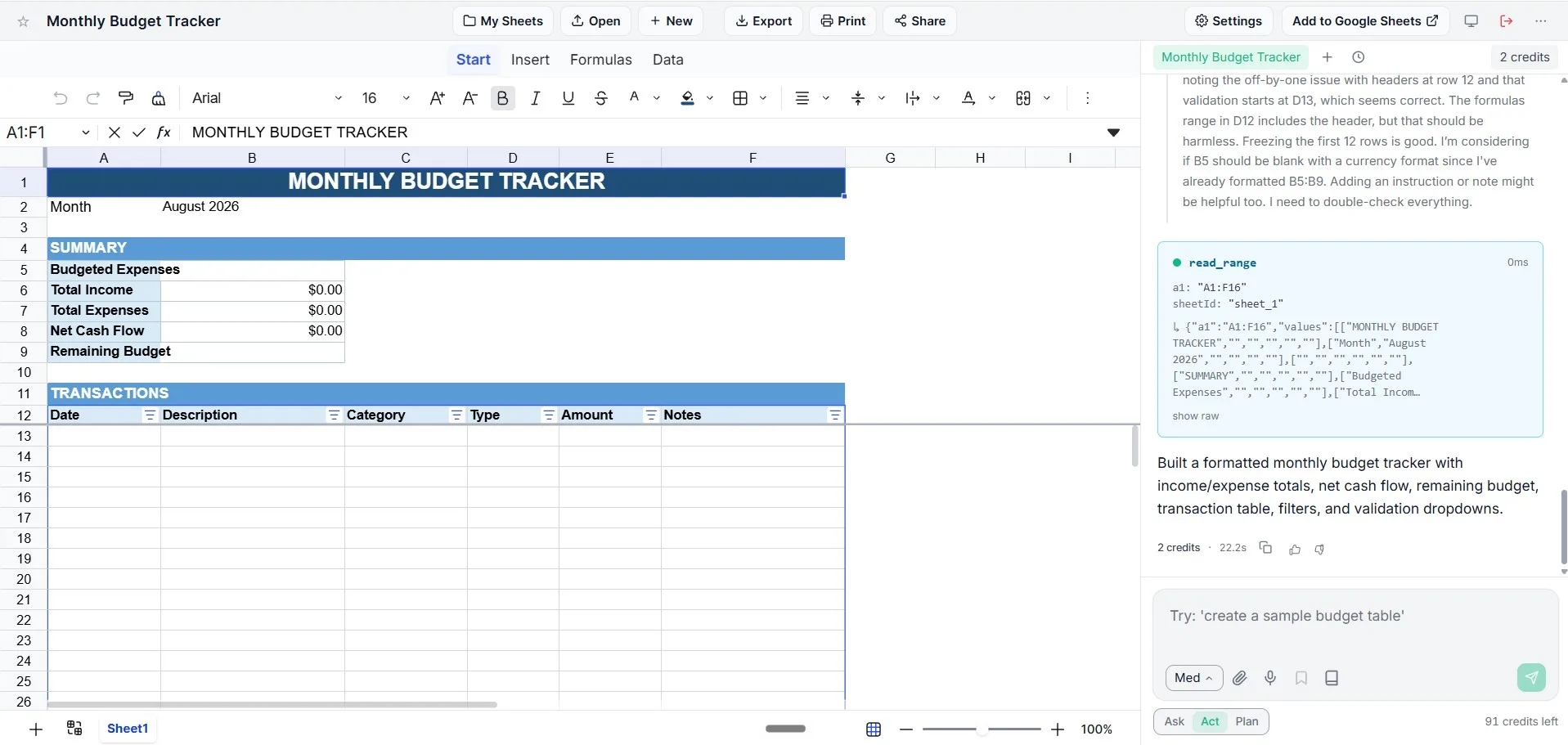
Twenty-two seconds later there was a formatted workbook on screen, at a cost of two credits. That part is easy to demo and, honestly, not that interesting. Plenty of tools can drop a template on you fast. What's worth looking at is everything in the result that the sentence never asked for, because that's the difference between a template and something built for the job.
What 22 seconds actually produced
| Block | What's in it |
|---|---|
| Title row | A merged banner across A1:F1, with the month filled in below it |
| Summary panel | Budgeted Expenses, Total Income, Total Expenses, Net Cash Flow, Remaining Budget: all formulas, not typed numbers |
| Transaction table | Date, Description, Category, Type, Amount, Notes |
| Filters | A filter button on every column header |
| Validation | Dropdowns on the columns where a typo would break a total |
| Frozen panes | The first 12 rows stay put, so the summary is visible while you scroll |
The structure is the giveaway. It didn't produce one flat grid of numbers; it produced a summary that reads from a table, which is the shape a budget actually needs once you've used it for more than a week.
The decisions nobody asked for
Net Cash Flow and Remaining Budget are two different rows
This is the one that made us stop and look. Net cash flow is income minus what you actually spent. Remaining budget is what you planned to spend minus what you've spent so far. Most homemade budget sheets collapse those into a single "left over" number and then quietly mislead you all month: you feel fine because money came in, while you're already through 90% of the grocery budget on the 12th. Two rows, two questions, and nothing in the prompt suggested the distinction.
Dropdowns on Category and Type
Free-typed categories are how budget sheets rot. Groceries, groceries and Grocery are three categories to a spreadsheet and one to you, so a month later the totals don't add up and nobody can see why. Validation on that column isn't decoration. It's what keeps every category total honest as the table grows.
Currency formatting and frozen headers
Small, but it's the housekeeping everyone skips and then resents. 1250 and $1,250.00 hold the same value and read completely differently at a glance, and a summary panel that scrolls off the screen is a summary you stop consulting.
Building your own
Start from a blank sheet
Open a new sheet and type your request into the chat panel on the right. There's nothing to set up first: no template to pick, no columns to define.
Describe the job, not the layout
"Build a simple monthly budget tracker with income, expenses, and totals" was enough. You don't need to specify merged cells, colours or formula syntax, and specifying them tends to produce a worse sheet than leaving the judgement alone.
Name your real categories
This is the single highest-value addition to the prompt. "Categories: rent, groceries, transport, subscriptions, eating out, savings" gets you dropdowns you'll actually use instead of generic ones you'll rewrite.
Then ask for the extras
Follow-up messages build on what's already there. A pie chart of spend by category, a second tab for next month, a red highlight when a category goes over budget. Each is one sentence, and each keeps the formulas that are already wired up.
What we'd still change by hand
Being straight about it: the build is a strong first draft, not a finished personal finance system. Three things we'd add before living in it for a month.
- A category breakdown. The summary totals income and expenses, but doesn't yet break spending down per category, which is the view most people actually open a budget for. One follow-up sentence adds it.
- A planned column. Budgeted Expenses is there as a row to fill in. If you want planned-versus-actual per category rather than in aggregate, say so up front and you'll get the extra column wired into the variance formula.
- More months. It builds the month you're in. Ask for twelve tabs, or a Month column and a filter, depending on whether you think in tabs or in pivots.
None of those are failures of the prompt so much as the consequence of asking for something "simple" and getting exactly that. The sentence you write is the spec you get.
Where the file goes afterwards
It's a real spreadsheet, not a preview. Export it to .xlsx or CSV, push it straight into Google Sheets, or keep working in the browser and let the AI keep editing it. The formulas travel with the file, so a tracker built in 22 seconds still opens in Excel next year with the totals intact. If you'd rather start from something pre-built and adjust, the budget tracker template is the same idea without the prompt.
Try the sentence yourself
Open a blank sheet, paste the prompt from the top of this article, and watch what it decides. Then tell it your real categories.
Build your budget tracker